Author: Jyoti Shinde

  • SEO, AEO & GEO for Dentists: Get Your Practice Found in the AI Search Era

    SEO, AEO & GEO for Dentists: Get Your Practice Found in the AI Search Era

    A patient with a throbbing tooth at 9pm doesn’t scroll through ten dental websites anymore. They ask their phone “emergency dentist near me open now” — and an AI reads the answer aloud, naming one or two practices. If yours isn’t named, the patient never knows you exist, even if you’re three minutes away and rank on page one of Google.

    This is the new reality of dental marketing in 2026. Getting found is no longer just about ranking — it’s about being the practice an AI chooses to recommend. This guide explains the three disciplines that decide that outcome — SEO, AEO, and GEO — why answer and generative optimisation matter so much for dentists specifically, and how Core Web Vitals quietly gatekeep the whole thing.
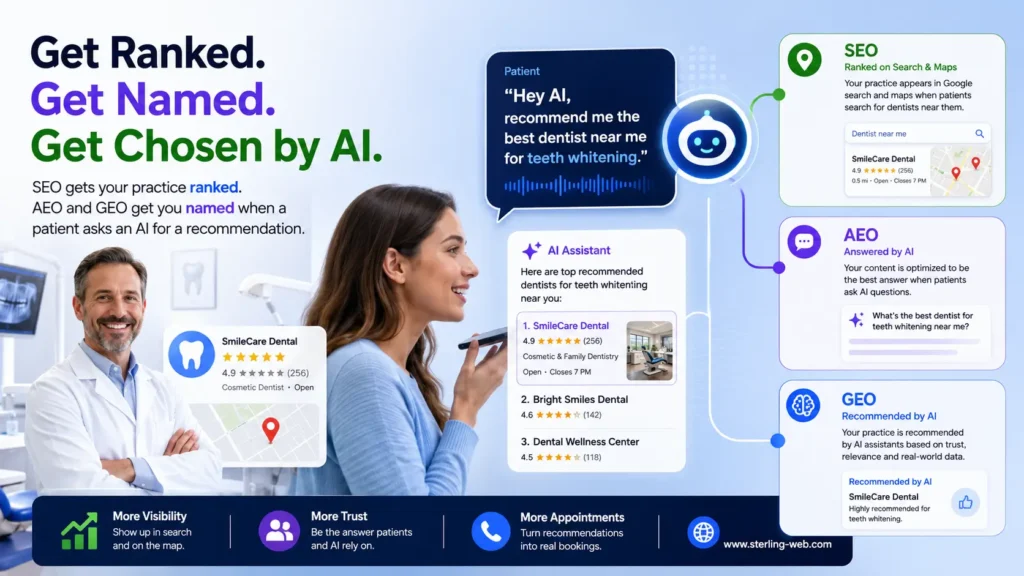
    SEO, AEO & GEO for Dentists
    SEO gets your practice ranked. AEO and GEO get you named when a patient asks an AI for a recommendation.

    Search changed — and dentistry is right in the middle of it

    At Google I/O in May 2026, Google confirmed its conversational AI Mode had passed one billion monthly users about a year after launch, and rolled out the biggest search redesign in over 25 years. For local, high-trust services like dental care, the shift is profound:

    • The AI answers before the links. When an AI summary appears, studies have measured click-through drops of roughly 34–46%. Many patient questions — “does a root canal hurt?”, “how much is a dental implant?” — are now answered without a single click.
    • One question becomes sixteen searches. Google’s “query fan-out” silently breaks a patient’s question into around 16 related searches, then synthesises one answer. Your site competes to be a trusted source within it.
    • Citation is the new ranking. Around 97% of AI Mode responses include at least one citation, and AI Mode and AI Overviews cite the same URLs only about 14% of the time. There are now several “front pages” to win.
    • Trust is everything. Dental content is “Your Money or Your Life” (YMYL) — health information AI engines treat with extra caution. They strongly favour sources with demonstrable expertise, real credentials, and verified reviews.

    For a dental practice, the goal isn’t “rank for dentist near me.” It’s “be the practice an AI confidently recommends to a patient who’s scared and in pain.”

    SEO, AEO, GEO — what each one means for a dental practice

    SEO — Search Engine Optimisation

    The foundation. SEO is everything that helps Google find, understand and rank your practice: a fast, crawlable website, treatment pages targeting what patients search for (“invisalign”, “teeth whitening”, “dental implants”), a fully optimised Google Business Profile, consistent name/address/phone (NAP) details everywhere, and local relevance for your suburb or city. For dentists, local SEO and the map pack are the bread and butter.

    AEO — Answer Engine Optimisation

    Optimising to be the direct answer to a patient’s question in featured snippets, voice search and AI answer boxes. Patients ask full questions: “is teeth whitening safe for sensitive teeth?”, “how long does Invisalign take?”. AEO means structuring clear, accurate, self-contained answers a machine can lift — turning your treatment FAQs into the source the answer engine quotes.

    GEO — Generative Engine Optimisation

    Optimising to be recommended by generative AI — Google AI Overviews and AI Mode, ChatGPT, Gemini, Perplexity. When a patient asks “find a good family dentist in [city] that takes my insurance and has evening hours,” GEO decides whether your practice is on the shortlist. It’s driven by trust signals: verified reviews, clinician credentials, consistent business data, and genuinely expert content.
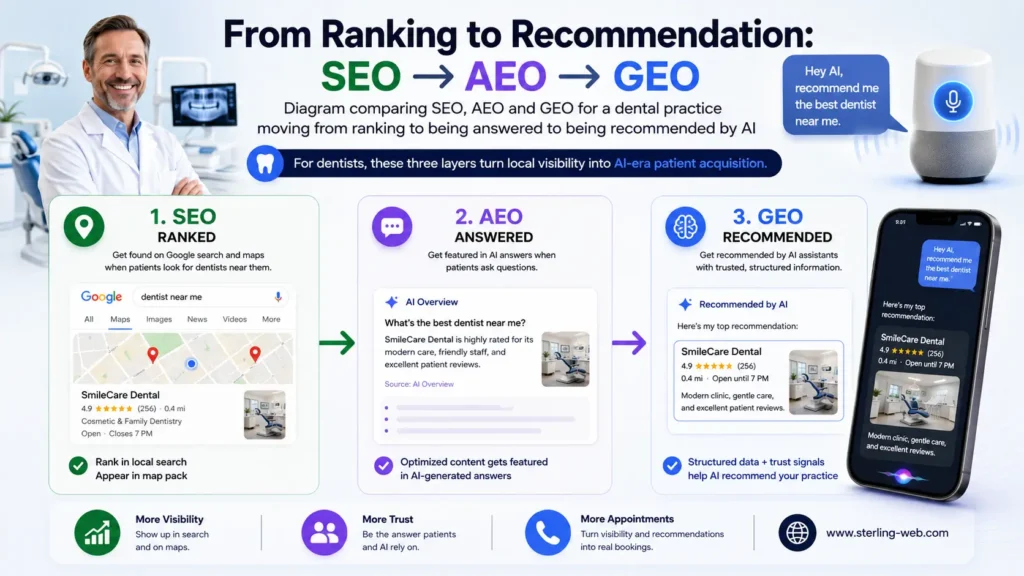
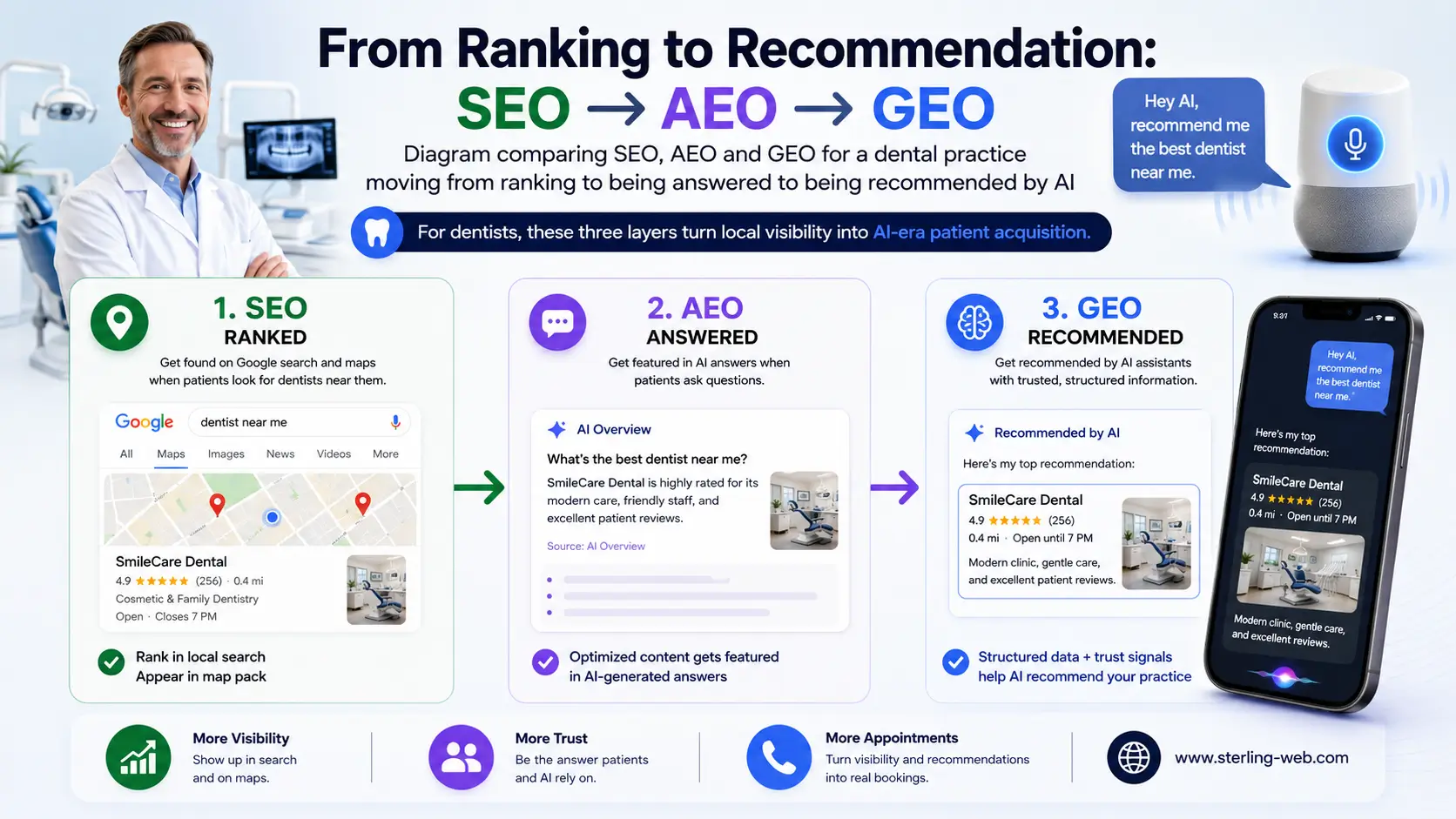
    Diagram comparing SEO, AEO and GEO for a local business moving from ranking to being answered to being recommended by AI
    For dentists, these three layers turn local visibility into AI-era patient acquisition.

    SEO vs AEO vs GEO — side by side

    FactorSEOAEOGEO
    GoalRank in results & the map packBe the direct answer to a questionBe recommended inside AI answers
    SurfaceBlue links, Google MapsSnippets, voice searchAI Overviews, AI Mode, ChatGPT, Perplexity
    Wins onLocal relevance, GBP, NAP, authorityClear, accurate answers to patient questionsTrust, reviews, credentials, entity consistency
    Query style“dentist near me”“does a root canal hurt?”“recommend a gentle family dentist in [city] open Saturdays”
    Success metricRankings, map visibility, callsSnippet & voice ownershipAI mentions & recommendations
    For your practiceFound for treatments & locationTrusted answer to dental questionsNamed when AI recommends a dentist

    These layers stack on a healthy technical foundation — you build all three, not one.

    Why AEO and GEO matter right now for dentists

    • Patients ask before they choose. The modern patient journey starts with questions — about pain, cost, safety, recovery. Whoever answers those questions credibly earns the trust, and usually the booking. AEO puts your practice in those answers.
    • Voice and “near me” are exploding. Emergency and convenience searches are increasingly spoken, hands-free, and answered by AI naming one or two options. If you’re not the one named, you’re not in the consideration set at all.
    • Trust is the deciding factor in health. Because dentistry is YMYL, AI engines lean hard on E-E-A-T — Experience, Expertise, Authoritativeness, Trust. Practices that surface real clinician bios, credentials and verified reviews are far likelier to be recommended than anonymous, thin sites.

    A fair, balanced note: Google’s own May 2026 guidance says that from its perspective, “AEO” and “GEO” are still SEO — its AI features run on the same ranking and quality systems, and no special markup is required just to appear. That’s accurate for Google. But it doesn’t reduce the value of the work. Structured data still earns rich results and helps AI read your practice details correctly, and AEO/GEO are simply how you make a dental site winnable across every AI surface — including ChatGPT and Perplexity, which Google doesn’t control. At SterlingWeb, we run them as one connected system, not three buzzwords.

    Core Web Vitals: the silent gatekeeper of patient bookings

    None of this matters if your website is slow. Before an AI engine cites you — and before an anxious patient bothers to book — the page has to load fast and behave predictably. Google’s Core Web Vitals measure exactly that, and after the March 2026 core update they carry more ranking weight than ever.
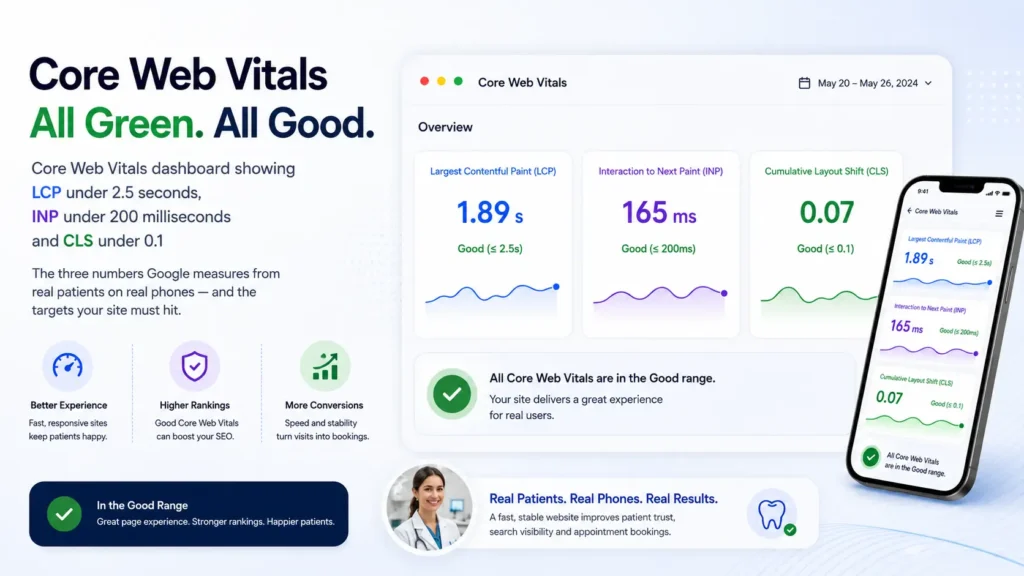
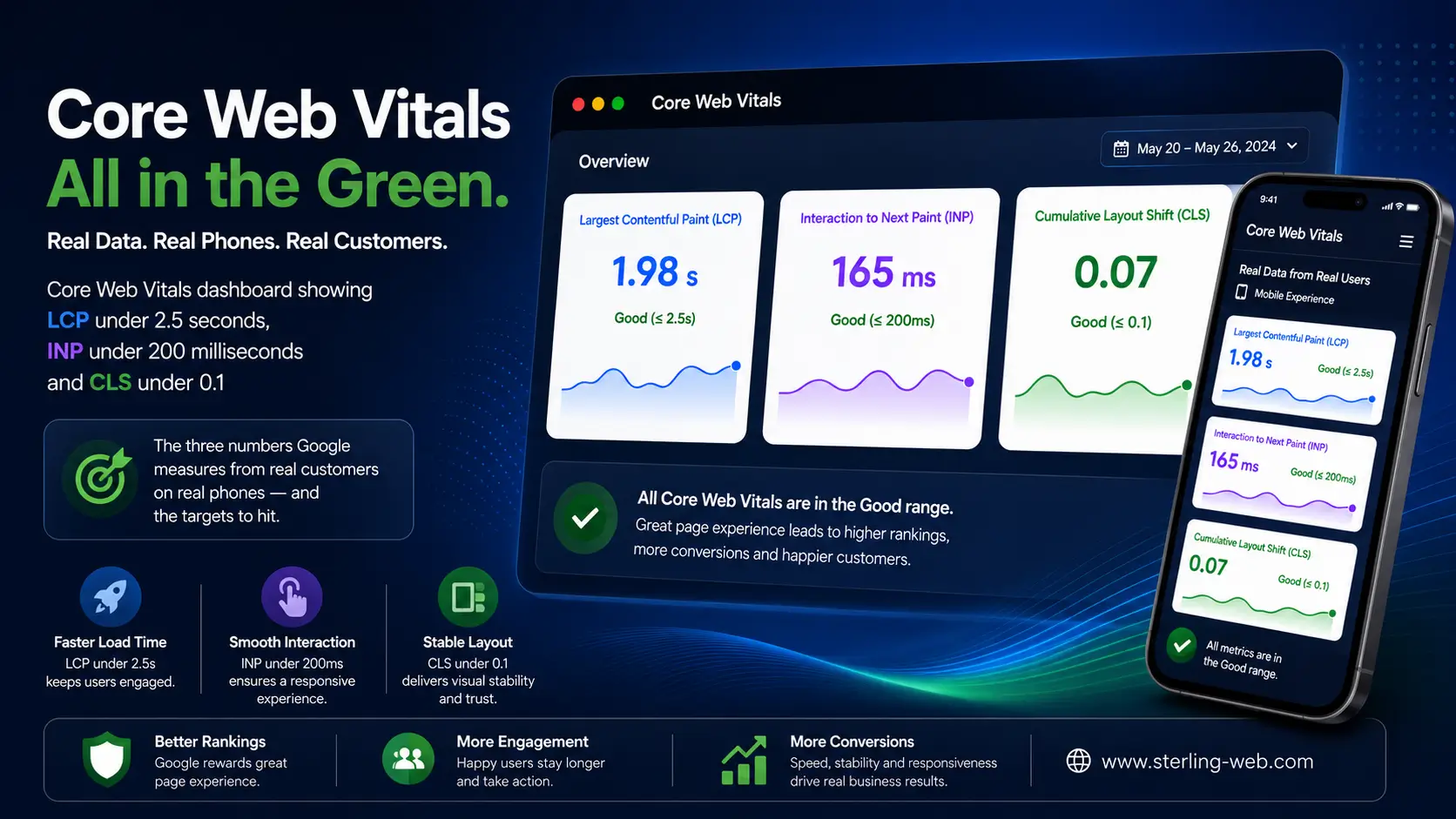
    Core Web Vitals dashboard showing LCP under 2.5 seconds, INP under 200 milliseconds and CLS under 0.1
    The three numbers Google measures from real patients on real phones — and the targets your site must hit.
    • LCP (Largest Contentful Paint) — how fast your main content loads. Good: under 2.5 seconds. Dental sites often fail this with heavy hero photos of the clinic or team.
    • INP (Interaction to Next Paint) — how fast the page responds when a patient taps “Book Appointment” or opens your contact form. Good: under 200 milliseconds. It replaced FID in March 2024 and is the most-failed metric (around 43% of sites), usually caused by heavy booking widgets and scripts.
    • CLS (Cumulative Layout Shift) — how much the layout jumps as it loads. Good: under 0.1. A “Book Now” button that shifts as a banner loads can cause mis-taps and lost bookings.

    Crucially, Google judges these at the 75th percentile of real users — your slowest realistic patient on a mid-range phone, not you on the office computer. The booking link is direct: every second of delay raises bounce and abandonment, and a frustrated patient simply taps the next practice. The biggest wins for dental sites are usually compressing and right-sizing imagery (LCP), trimming or deferring booking-widget JavaScript (INP), and reserving space for buttons and banners so nothing jumps (CLS).

    How AI search changes the game — real patient scenarios

    • The worried patient asks ChatGPT: “is it normal for a tooth to hurt after a filling?” Your clinically accurate, clearly structured FAQ becomes the cited answer — and your practice name travels with it. That’s AEO + GEO.
    • The new mover asks Gemini: “best family dentist in [city] with good reviews and evening hours.” Your verified reviews, accurate hours, and consistent business data decide whether you make the shortlist. That’s GEO.
    • The emergency says: “emergency dentist near me open now.” Your Google Business Profile, accurate hours and local relevance decide if you’re surfaced. That’s SEO — plus a fast site that loads before they give up.

    The connective tissue is twofold: local + medical structured data (Dentist / LocalBusiness, with address, hours, services and reviews) so engines read your practice correctly, and genuine expertise on the page — named, credentialed clinicians answering real questions. Generic, anonymous dental content earns no citations in a YMYL category. Demonstrable experience does.

    Your dental practice AI-search readiness checklist

    • Add Dentist / LocalBusiness schema with address, phone, opening hours, services and geo-coordinates.
    • Fully optimise your Google Business Profile and keep NAP details identical across every directory.
    • Publish credentialed clinician bios — real names, qualifications, experience — to strengthen E-E-A-T.
    • Build treatment FAQ blocks that answer one patient question clearly per section (pain, cost, recovery, safety).
    • Actively collect and surface genuine patient reviews; respond to them.
    • Fix Core Web Vitals: compress clinic photos (LCP), defer booking-widget scripts (INP), reserve space for buttons (CLS).

    Frequently asked questions

    Is local SEO still important for dentists in 2026?

    Absolutely. Local SEO — an optimised Google Business Profile, consistent NAP data, and local relevance — remains the foundation for being found. AI engines draw heavily on this same data, so strong local SEO directly feeds your AEO and GEO visibility.

    How can my dental practice get recommended by AI like ChatGPT?

    By being a trustworthy, consistent, expert source: accurate business data everywhere, credentialed clinician content, verified reviews, clearly structured answers to patient questions, and a fast, technically healthy website. AI engines favour sources with strong expertise and trust signals, especially for health topics.

    What is E-E-A-T and why does it matter for dental websites?

    E-E-A-T stands for Experience, Expertise, Authoritativeness and Trust. Because dental content affects health (a “Your Money or Your Life” topic), search and AI engines weigh these signals heavily. Real clinician credentials, accurate information and genuine reviews make your practice far more likely to be ranked and recommended.

    How do Core Web Vitals affect patient bookings?

    Core Web Vitals measure how fast (LCP), responsive (INP) and stable (CLS) your site feels to real patients. A slow or unstable site increases bounce and abandoned bookings, hurts rankings, and can keep AI engines from indexing and citing you. Hitting the “good” thresholds protects both visibility and conversions.


    Make your practice the one AI recommends

    In the AI era, the practices that grow are fast, trusted, and structured well enough that AI engines recommend them by name to the patients who need them most. That’s the work SterlingWeb does — technical SEO, AEO, GEO, schema, and Core Web Vitals, tailored for dental practices.
    Explore our Technical SEO, AEO & GEO services

    Visit SterlingWeb

  • SEO vs AEO vs GEO for Local Businesses: Getting Found When AI Answers First

    SEO vs AEO vs GEO for Local Businesses: Getting Found When AI Answers First

    Someone two streets away just asked their phone, “where can I get my watch battery replaced near me?” An AI answered instantly — naming one business. If it wasn’t yours, you didn’t lose to a competitor with a better shop or lower price. You lost to a competitor whose information the AI trusted more. In 2026, that’s how most local discovery now works.

    For local businesses — cafés, salons, plumbers, repair shops, studios, clinics — the rules of getting found have changed. This guide explains the three disciplines that now decide whether customers can find you — SEO, AEO, and GEO — why answer and generative optimisation are suddenly essential, and how Core Web Vitals quietly control the whole thing. No jargon for its own sake; just what to fix and why.

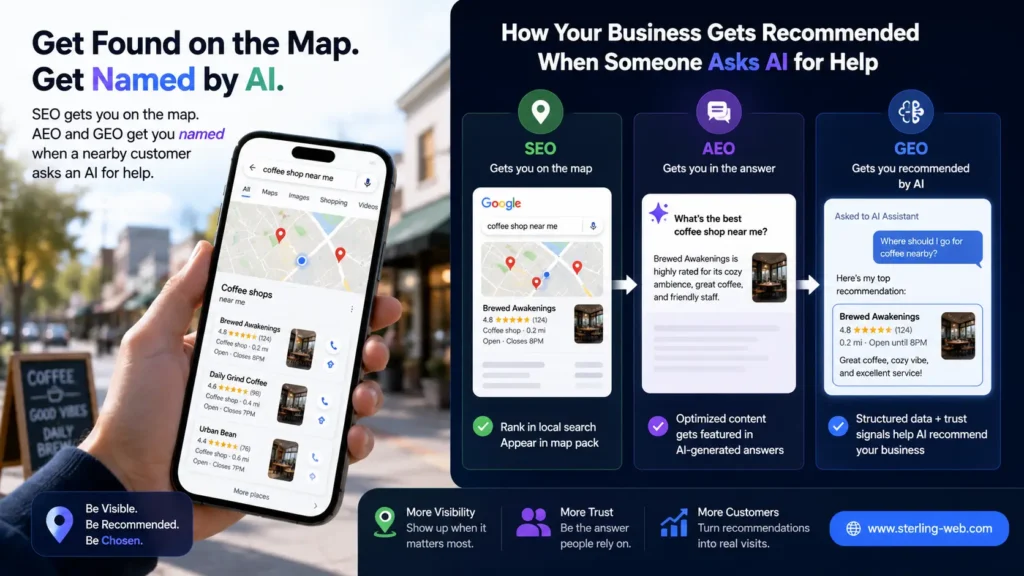
    A customer using a phone to find a local business while SEO, AEO and GEO labels show how it gets recommended by AI

    Local search just got an AI middleman

    At Google I/O in May 2026, Google confirmed its conversational AI Mode had crossed one billion monthly users about a year after launch, and unveiled the biggest search-box redesign in over 25 years. For local businesses, that middleman changes everything:

    • The AI answers first. When an AI summary appears, studies have measured click-through drops of roughly 34–46%. The customer often gets your hours, your reviews, and a recommendation without ever visiting a website.
    • One question becomes sixteen. Google’s “query fan-out” breaks a single request into around 16 parallel searches, then synthesises one answer. Your business competes to be a trusted source within it.
    • Being named is the new ranking. Around 97% of AI Mode responses include at least one citation, and AI Mode and AI Overviews cite the same URLs only about 14% of the time — so there are now several “front pages” you can win.
    • Consistency wins. AI engines need to be confident your business is real, open, and where it says it is. Conflicting hours, addresses or phone numbers across the web make AI hesitate — and hesitation means it recommends someone else.

    The question is no longer “do I rank for my service near me?” It’s “when an AI helps a nearby customer, is my business the one it confidently names?”

    SEO, AEO, GEO — what each one means for a local business

    SEO — Search Engine Optimisation

    The foundation. SEO is everything that helps Google find, understand and rank your business locally: a fast, crawlable website, service and location pages, an optimised Google Business Profile, consistent name/address/phone (NAP) data, local citations, and reviews. For local businesses, the map pack — those top three local results — is the prize SEO competes for.

    AEO — Answer Engine Optimisation

    Optimising to be the direct answer to a customer’s question in featured snippets, voice search and AI answer boxes. Customers ask full questions: “what time does the hardware store close?”, “do you take walk-ins?”, “how much does a deep clean cost?”. AEO means structuring clear, accurate answers a machine can lift — making your site the source the answer engine quotes.

    GEO — Generative Engine Optimisation

    Optimising to be recommended by generative AI — Google AI Overviews and AI Mode, ChatGPT, Gemini, Perplexity. When someone asks “find a reliable plumber near me with good reviews who can come today,” GEO decides whether you’re on the shortlist. It’s driven by trust: genuine reviews, consistent business data, clear service information, and a real online presence.

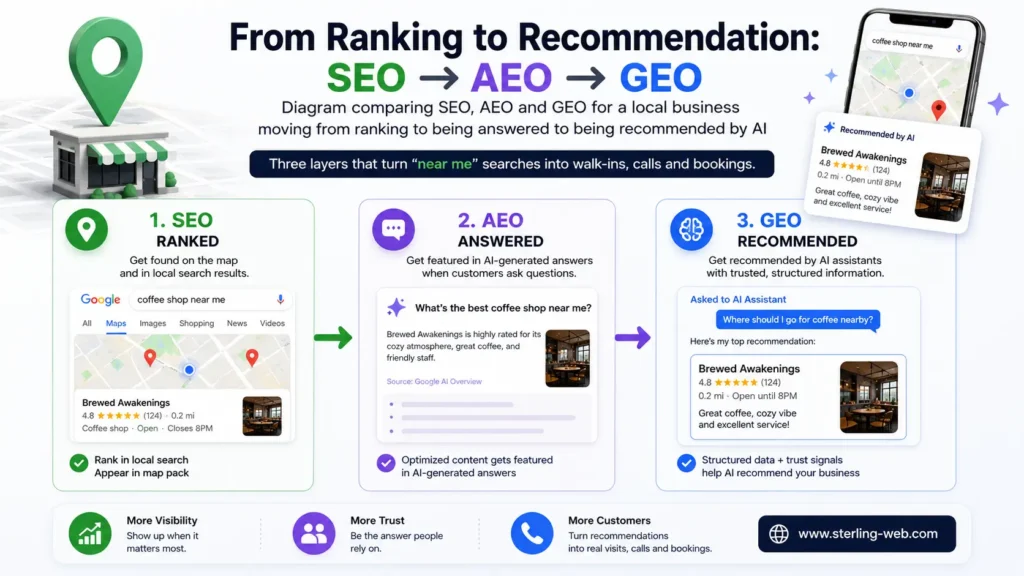
    Diagram comparing SEO, AEO and GEO for a local business moving from ranking to being answered to being recommended by AI
    Three layers that turn “near me” searches into walk-ins, calls and bookings.

    SEO vs AEO vs GEO — side by side

    FactorSEOAEOGEO
    GoalRank in results & the map packBe the direct answer to a questionBe recommended inside AI answers
    SurfaceBlue links, Google MapsSnippets, voice searchAI Overviews, AI Mode, ChatGPT, Perplexity
    Wins onLocal relevance, GBP, NAP, citationsClear, accurate answers to customer questionsTrust, reviews, consistency, entity recognition
    Query style“plumber near me”“what time does the bakery open?”“recommend a reliable plumber near me available today”
    Success metricRankings, map visibility, callsSnippet & voice ownershipAI mentions & recommendations
    For your businessFound for service & locationTrusted answer to customer questionsNamed when AI recommends a local option

    You don’t pick one. You build all three on a fast, healthy website.

    Why AEO and GEO matter right now for local businesses

    • “Near me” went conversational. Customers no longer type two keywords — they ask full, spoken questions and expect one good answer. The business that is that answer wins the visit; everyone else is invisible.
    • The AI decides the shortlist. When AI recommends “the best three options near you,” getting onto that list is the whole game. GEO is how you earn a spot — through reviews, consistency and trust signals.
    • Most local competitors are asleep at the wheel. Plenty of local businesses still have inconsistent listings, no structured data, and a slow site. That’s your opening to become the obvious AI pick in your area — before they catch up.

    An honest, balanced point: Google’s May 2026 guidance states that from its own perspective, “AEO” and “GEO” are still SEO — its AI features run on the same ranking and quality systems, and no special markup is required just to appear. That’s true for Google. But it doesn’t lower the value of the work. Structured data still earns rich results and helps AI read your business correctly, and AEO/GEO are simply how you make a local site winnable across every AI surface — including ChatGPT and Perplexity, which Google doesn’t control. At SterlingWeb, we treat them as one connected system rather than competing buzzwords.

    Core Web Vitals: the gatekeeper between you and the customer

    None of this works if your website is slow. Before an AI engine cites you — and before a customer with three options bothers to wait — your page has to load fast and stay stable. Google’s Core Web Vitals measure that real-world experience, and after the March 2026 core update they carry more ranking weight than ever.

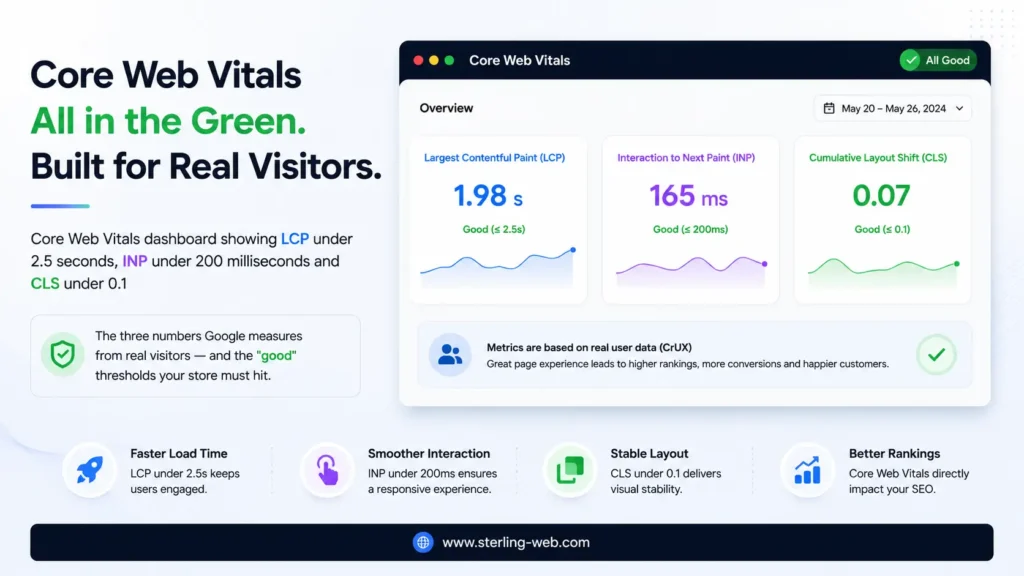
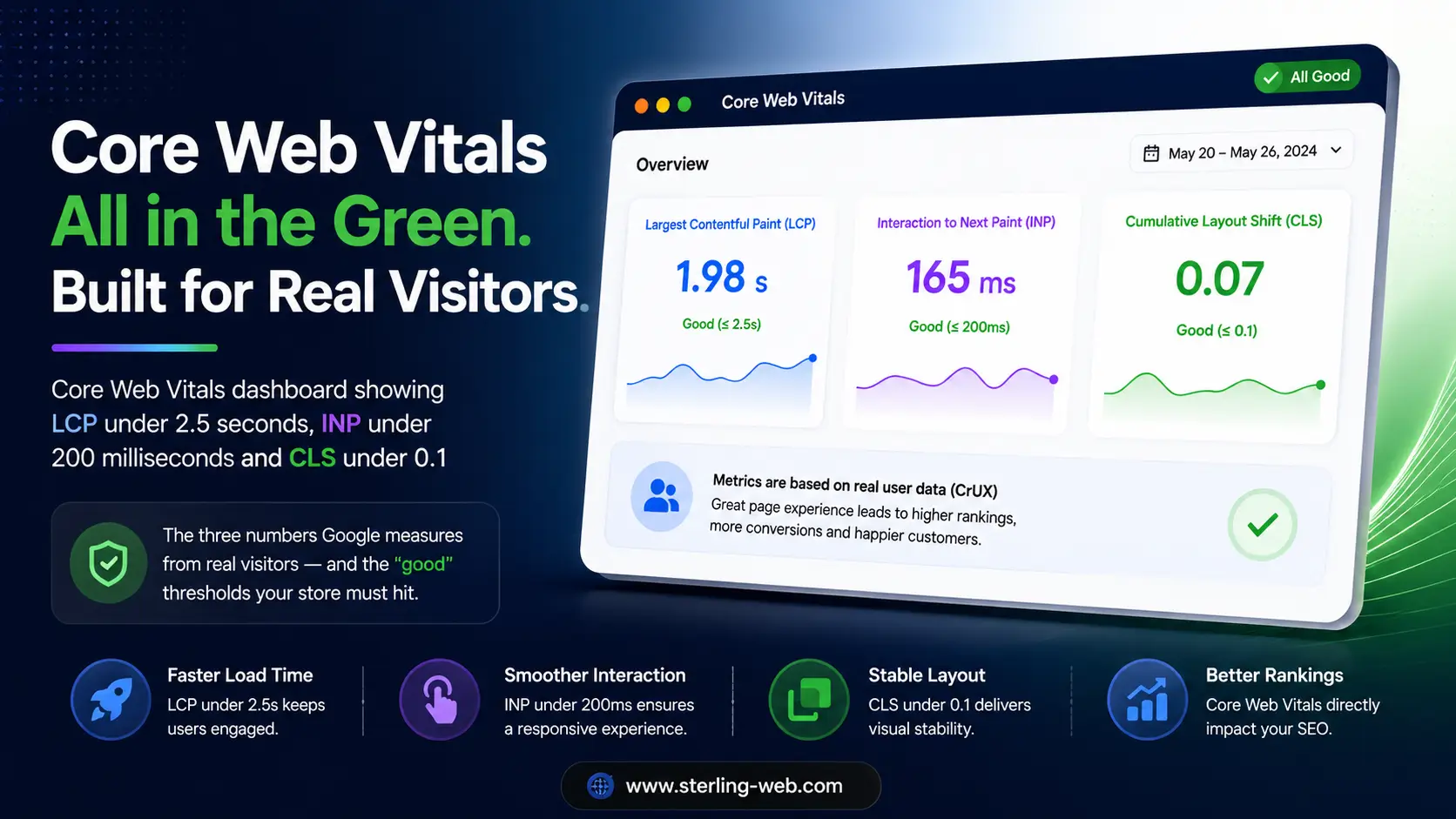
    Core Web Vitals dashboard showing LCP under 2.5 seconds, INP under 200 milliseconds and CLS under 0.1 The three numbers Google measures from real visitors — and the "good" thresholds your store must hit.
    The three numbers Google measures from real customers on real phones — and the targets to hit.
    • LCP (Largest Contentful Paint) — how fast your main content loads. Good: under 2.5 seconds. Big, unoptimised photos of your premises or products are the usual cause.
    • INP (Interaction to Next Paint) — how fast the page responds when a customer taps “Call”, “Directions” or a booking form. Good: under 200 milliseconds. It replaced FID in March 2024 and is the most-failed metric (around 43% of sites), usually from heavy scripts and plugins.
    • CLS (Cumulative Layout Shift) — how much the layout jumps as it loads. Good: under 0.1. A “Call Now” button that shifts as an image loads causes mis-taps and lost customers.

    Google measures these at the 75th percentile of real users — your slowest realistic customer on a mid-range phone with a patchy signal, not you on fast wi-fi. The link to revenue is direct: every second of delay raises bounce, and a customer comparing options simply taps the next result. For most local sites, the biggest wins are compressing and right-sizing images (LCP), trimming or deferring plugin scripts (INP), and reserving space for buttons and banners (CLS).

    How AI search changes the game — real local scenarios

    • The urgent customer asks: “locksmith near me open now.” Your Google Business Profile, accurate hours and local relevance decide if you’re surfaced. That’s SEO — plus a site fast enough to load before they call someone else.
    • The planner asks Gemini: “best brunch spot near me with outdoor seating and good reviews.” Your reviews, accurate details and clear service info decide if you make the shortlist. That’s GEO.
    • The question-asker says: “do dry cleaners near me do same-day service?” Your clearly structured service FAQ becomes the cited answer, carrying your name with it. That’s AEO.

    The connective tissue is LocalBusiness structured data (name, address, hours, services, geo-coordinates, reviews) so engines read you correctly, plus rock-solid consistency across your website, Google Business Profile, and every directory. When your facts match everywhere, AI trusts you. When they conflict, it picks the competitor it’s more sure about.

    Your local business AI-search readiness checklist

    • Claim and fully optimise your Google Business Profile — categories, services, hours, photos, posts.
    • Make your NAP (name, address, phone) identical across your site and every directory and citation.
    • Add LocalBusiness schema with address, opening hours, services and geo-coordinates.
    • Build clear service and location pages, plus FAQ blocks answering one customer question per section.
    • Actively collect genuine reviews and respond to them — reviews are a top AI trust signal.
    • Fix Core Web Vitals: compress images (LCP), defer scripts (INP), reserve space for buttons (CLS).

    Frequently asked questions

    Is local SEO still relevant with AI search?

    Yes — more than ever. AI engines pull from the same local signals SEO optimises: your Google Business Profile, consistent NAP data, reviews and local relevance. Strong local SEO is the foundation that makes AEO and GEO visibility possible.

    How does my local business get recommended by AI?

    By being a trustworthy, consistent source: an optimised Google Business Profile, identical business details everywhere, genuine reviews, clear service information with structured data, and a fast website. AI engines recommend businesses they can confidently verify and that customers rate well.

    Why does NAP consistency matter so much?

    NAP stands for Name, Address, Phone. When these match across your website, Google Business Profile and directories, search and AI engines trust your business is real and accurate. Conflicting details create doubt, and AI tends to recommend a competitor it’s more certain about.

    How do Core Web Vitals affect local customers?

    Core Web Vitals measure how fast (LCP), responsive (INP) and stable (CLS) your site feels to real visitors on real phones. A slow or jumpy site increases bounce, loses calls and bookings, hurts rankings, and can stop AI engines from citing you. Hitting the “good” thresholds protects both visibility and customers.


    Become the local business AI recommends

    In the AI era, the businesses that grow are fast, consistent, and trusted enough that AI engines name them to nearby customers. That’s exactly what SterlingWeb builds — technical SEO, AEO, GEO, schema, and Core Web Vitals, tuned for local businesses.

    Explore our Technical SEO, AEO & GEO services

    Visit SterlingWeb

  • SEO vs AEO vs GEO for Shopify Stores: Winning Sales in the AI Search Era

    SEO vs AEO vs GEO for Shopify Stores: Winning Sales in the AI Search Era

    Your Shopify store can rank #1 on Google and still lose the sale. In 2026 that sentence isn’t a paradox — it’s the new default. A shopper types “best magnesium gummies for sleep,” and before a single blue link loads, Google’s AI writes a paragraph naming three brands, summarising the reviews, and comparing the price per serving. If your product isn’t inside that answer, the ranking underneath it barely matters.

    This guide breaks down the three disciplines now deciding which Shopify stores get discovered — SEO, AEO, and GEO — how they differ, why answer and generative optimisation are no longer optional, and where Core Web Vitals fit into all of it. It’s written for store owners and merchants, not just developers, so you’ll leave knowing exactly what to fix first.

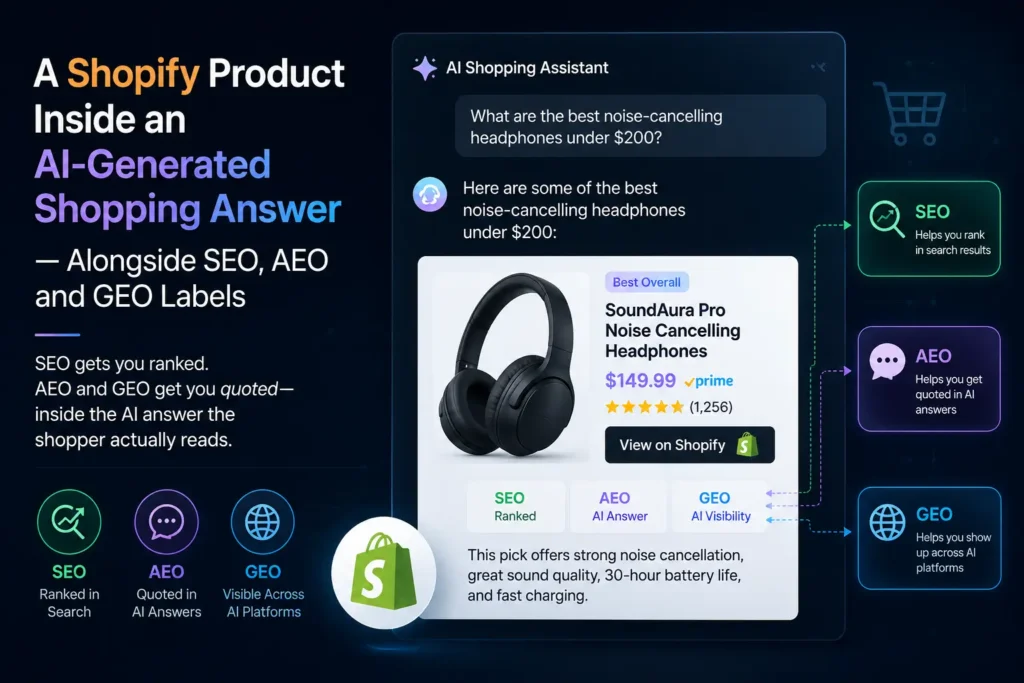
    A Shopify product appearing inside an AI-generated shopping answer alongside SEO, AEO and GEO labels
SEO gets you ranked. AEO and GEO get you quoted — inside the AI answer the shopper actually reads.
    SEO gets you ranked. AEO and GEO get you quoted — inside the AI answer the shopper actually reads.

    Search didn’t evolve. It got replaced.

    For twenty years, the deal was simple: optimise your pages, climb the rankings, earn the click. That deal is being rewritten in real time. At Google I/O in May 2026, Google confirmed that its conversational AI Mode had crossed one billion monthly users roughly a year after launch — one of the fastest-scaling products in the company’s history — and announced the biggest redesign of the search box in over 25 years.

    Here’s what that means for a store owner in plain numbers:

    • AI answers first, links second. When an AI summary appears, independent studies have measured click-through rate drops of roughly 34–46%. On AI Mode specifically, some 2026 estimates put the share of searches ending without any outbound click as high as 90%+.
    • The AI reads sixteen pages, not one. Google uses a “query fan-out” technique — a single shopper question is silently broken into around 16 parallel searches across subtopics, then synthesised into one answer. Your store competes to be one of the sources it pulls from.
    • Being cited is the new ranking. Around 97% of AI Mode responses include at least one citation, and AI Mode and AI Overviews cite the same URLs only about 14% of the time (per Ahrefs). Translation: there are now multiple “first pages” to win, not one.
    • AI-referred traffic is exploding. Previsible reported AI-referred sessions up 527% year-over-year. The traffic that does click through is smaller — but higher-intent.

    The question for 2026 isn’t “where do I rank?” It’s “when an AI describes my category, does it mention my store — and does it get the facts right?”

    SEO, AEO, GEO: what each one actually means

    SEO — Search Engine Optimisation

    The foundation. SEO is everything that helps Google crawl, understand, and rank your store: clean site architecture, fast pages, keyword-aligned product and collection content, internal links, and structured data. For Shopify this means optimised product titles and descriptions, sensible collection pages, working canonical tags, and a crawlable navigation. SEO is not dead — it’s the soil everything else grows in.

    AEO — Answer Engine Optimisation

    Optimising to be the direct answer to a specific question — in featured snippets, voice search, and AI answer boxes. AEO is about structure and clarity: answering “Is creatine safe to take daily?” in a clean, self-contained block that a machine can lift cleanly. For a Shopify store, AEO turns your product education, FAQs, and buying guides into the source an answer engine quotes.

    GEO — Generative Engine Optimisation

    Optimising to be cited and recommended by generative AI platforms — Google AI Overviews and AI Mode, ChatGPT Search, Perplexity, Gemini, and Claude. GEO is about being seen as a trustworthy, distinctive source: original data, real expertise, consistent brand information across the web, and machine-readable facts about your products. When a shopper asks ChatGPT “what’s the best protein powder for a lactose-intolerant runner?”, GEO decides whether your brand makes the shortlist.

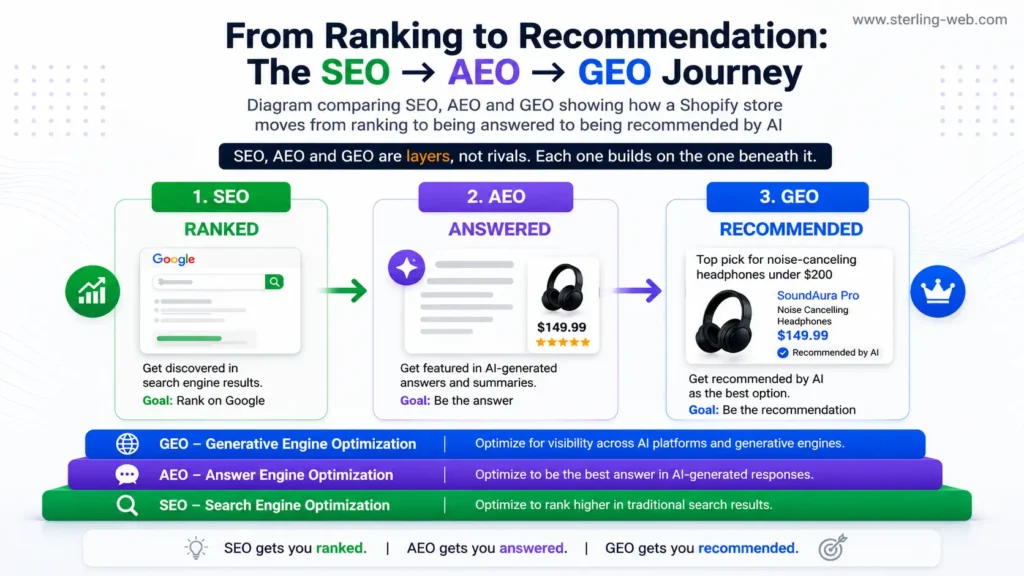
    Diagram comparing SEO, AEO and GEO showing how a Shopify store moves from ranking to being answered to being recommended by AI
SEO, AEO and GEO are layers, not rivals. Each one builds on the one beneath it.

    SEO vs AEO vs GEO — side by side

    FactorSEOAEOGEO
    GoalRank in the list of resultsBe the direct answer to a questionBe cited / recommended inside AI answers
    SurfaceClassic blue linksFeatured snippets, voice, answer boxesAI Overviews, AI Mode, ChatGPT, Perplexity, Gemini
    Wins onKeywords, authority, technical healthClear, structured, self-contained answersTrust, originality, entity consistency, structured facts
    Query style“magnesium gummies”“are magnesium gummies good for sleep?”“recommend a magnesium supplement for a 40-year-old with anxiety”
    Success metricRanking position & clicksSnippet ownership & voice answersCitations, brand mentions, AI recommendations
    For your Shopify storeProduct/collection pages found & indexedBuying guides & FAQs answer real questionsYour brand named when AI suggests products

    These layers stack. You don’t choose one — you build all three on a healthy technical base.

    Why AEO and GEO matter right now for Shopify merchants

    E-commerce sits directly in the blast radius of AI search, because shopping queries are exactly the kind AI loves to answer: comparisons, recommendations, “best X for Y” questions. Google is already testing direct-purchase ads and shopping inside AI Mode — the model is shifting from “I’ll send you to the store” to “buy this here.” Three reasons this is urgent:

    • Product discovery is moving inside the AI. Shoppers increasingly ask an assistant to do the comparison shopping. If your products aren’t structured for machines to read — price, availability, materials, reviews — you’re invisible to that flow.
    • The agentic web is coming. AI shopping agents (OpenAI’s Operator and others) browse, compare and complete tasks for users. They favour stores with clear pricing tables, feature comparisons and clean structured data. Messy PDPs get skipped.
    • Your competitors haven’t done it yet. Most Shopify stores still run default theme metadata and zero product schema. The window to be the brand AI knows in your niche is open — and closing.

    A balanced note worth making: in May 2026, Google published official guidance stating that, from its perspective, “AEO” and “GEO” are still SEO — its AI features run on the same core ranking and quality systems, and you don’t need special files or markup just to appear. That’s true for Google. But it doesn’t change the practical reality: structured data still earns rich results and helps machines understand your products unambiguously, and the disciplines of AEO and GEO are simply how you make a store winnable across every AI surface — including the ones Google doesn’t control, like ChatGPT and Perplexity. At SterlingWeb, we treat them as one connected system rather than three competing buzzwords.

    Core Web Vitals: the gatekeeper nobody skips

    Here’s the part merchants underestimate: none of the above happens if your store is slow. Before an AI engine will cite you, the page has to be indexed, fast, and stable. Google’s Core Web Vitals are the three metrics that measure this real-world experience, and after the March 2026 core update they carry more ranking weight than ever.

    Core Web Vitals dashboard showing LCP under 2.5 seconds, INP under 200 milliseconds and CLS under 0.1 The three numbers Google measures from real visitors — and the "good" thresholds your store must hit.
    • LCP (Largest Contentful Paint) — how fast your main content loads. Good: under 2.5 seconds. On Shopify, the usual culprit is an oversized hero or product image.
    • INP (Interaction to Next Paint) — how quickly the page responds when a shopper taps “Add to Cart” or filters a collection. Good: under 200 milliseconds. This replaced FID in March 2024 and is the most commonly failed metric — around 43% of sites fail it — because it’s caused by heavy JavaScript, and Shopify stores stack a lot of apps.
    • CLS (Cumulative Layout Shift) — how much the layout jumps as it loads. Good: under 0.1. The classic offender is a product grid that shifts as images and review widgets pop in.

    Two things make this business-critical for stores. First, Google judges these at the 75th percentile of real users — meaning your slowest realistic shopper on a mid-range phone has to have a good experience, not just you on office wi-fi. Second, the revenue link is direct: a one-second delay is associated with roughly 7% fewer conversions, and stores that pass all three metrics see meaningfully lower bounce rates. On Shopify, the highest-impact fixes are usually auditing and removing unused apps, serving properly sized next-gen images, lazy-loading below-the-fold content, and reserving space for review and dynamic widgets so nothing jumps.

    How AI search changes the Shopify game — with real examples

    Picture three shoppers in 2026:

    • The researcher asks Perplexity: “compare the top 3 reusable water bottles for keeping drinks cold 24 hours.” It returns a comparison with citations. GEO decides if your bottle is one of the three — driven by clear specs on your PDP, third-party reviews, and consistent brand facts across the web.
    • The voice shopper asks their phone: “what’s a good gift for a coffee lover under $50?” AEO decides if your gift guide is the answer — driven by a clean, structured, genuinely useful guide rather than a thin product dump.
    • The classic searcher still types “organic dog treats” into Google. SEO plus Core Web Vitals decides if you rank and load fast enough to earn the click that AI didn’t intercept.

    The winning store serves all three — and the connective tissue is structured product data (Product, Offer, AggregateRating, Brand) so every engine reads your price, stock, and ratings without guessing, plus original, non-commodity content that an AI can’t just write itself. Generic “5 benefits of X” posts earn zero citations; your real test results, sizing data, and customer outcomes earn them.

    Your Shopify AI-search readiness checklist

    • Add complete Product schema (price, availability, brand, GTIN) and AggregateRating to every product page.
    • Rewrite product descriptions to answer real buyer questions — materials, sizing, use-cases — not just feature lists.
    • Build buying guides and FAQ blocks that answer one clear question per section (AEO gold).
    • Audit your apps and theme JavaScript to fix INP; resize and serve next-gen images to fix LCP.
    • Keep your brand facts identical everywhere — Google Merchant Center, your About page, social, directories — so AI can resolve your store as one trusted entity.
    • Publish original data: tests, comparisons, real customer results that AI can’t fabricate.

    Frequently asked questions

    Is SEO still worth it for Shopify in 2026?

    Yes. SEO is the foundation AEO and GEO are built on. AI features run on the same core ranking systems, so a technically healthy, well-optimised store is the prerequisite for being cited by any AI engine. SEO hasn’t been replaced — it’s been expanded.

    What’s the difference between AEO and GEO?

    AEO (Answer Engine Optimisation) focuses on being the direct answer to a specific question in snippets and voice search. GEO (Generative Engine Optimisation) focuses on being cited and recommended inside generative AI answers like AI Overviews, ChatGPT and Perplexity. They overlap heavily and are best run as one strategy.

    Do I need special schema to appear in AI search?

    Google says no special markup is required just to appear in its AI features. However, standard structured data (Product, Offer, AggregateRating) still earns rich results and helps every engine — including ChatGPT and Perplexity — read your products accurately, so it remains strongly recommended for Shopify stores.

    How do Core Web Vitals affect my Shopify sales?

    Core Web Vitals measure load speed (LCP), responsiveness (INP) and visual stability (CLS) from real visitors. They’re a ranking signal and a conversion driver — a one-second delay is linked to roughly 7% fewer conversions. Slow stores also struggle to be indexed and cited by AI engines.


    Make your Shopify store the one AI recommends

    Ranking is no longer the finish line. The stores that win in the AI era are fast, structured, and trusted enough that AI engines quote them by name. That’s exactly the work SterlingWeb specialises in — technical SEO, AEO, GEO, schema, and Core Web Vitals, built for Shopify.

    Explore our Technical SEO, AEO & GEO services

    Visit SterlingWeb

  • Shopify Migration Guide: How to Move to Shopify Without Losing SEO or Sales

    Shopify Migration Guide: How to Move to Shopify Without Losing SEO or Sales

    Most ecommerce migrations fail silently.

    Not because the new platform is bad.

    Because businesses underestimate how complex migration actually is.

    Many store owners think migration means:

    • exporting products
    • importing products
    • changing themes
    • launching the new store

    That is only a small part of the process.

    A poorly executed Shopify migration can destroy:

    • SEO rankings
    • conversion rates
    • customer trust
    • analytics tracking
    • operational workflows
    • email automation
    • site speed

    At SterlingWeb Growth Labs, we regularly work with brands migrating from:

    • WooCommerce
    • Magento
    • Wix
    • BigCommerce
    • custom ecommerce systems

    And the biggest mistake businesses make is treating migration like a simple website redesign.

    It is not.

    It is business infrastructure migration.

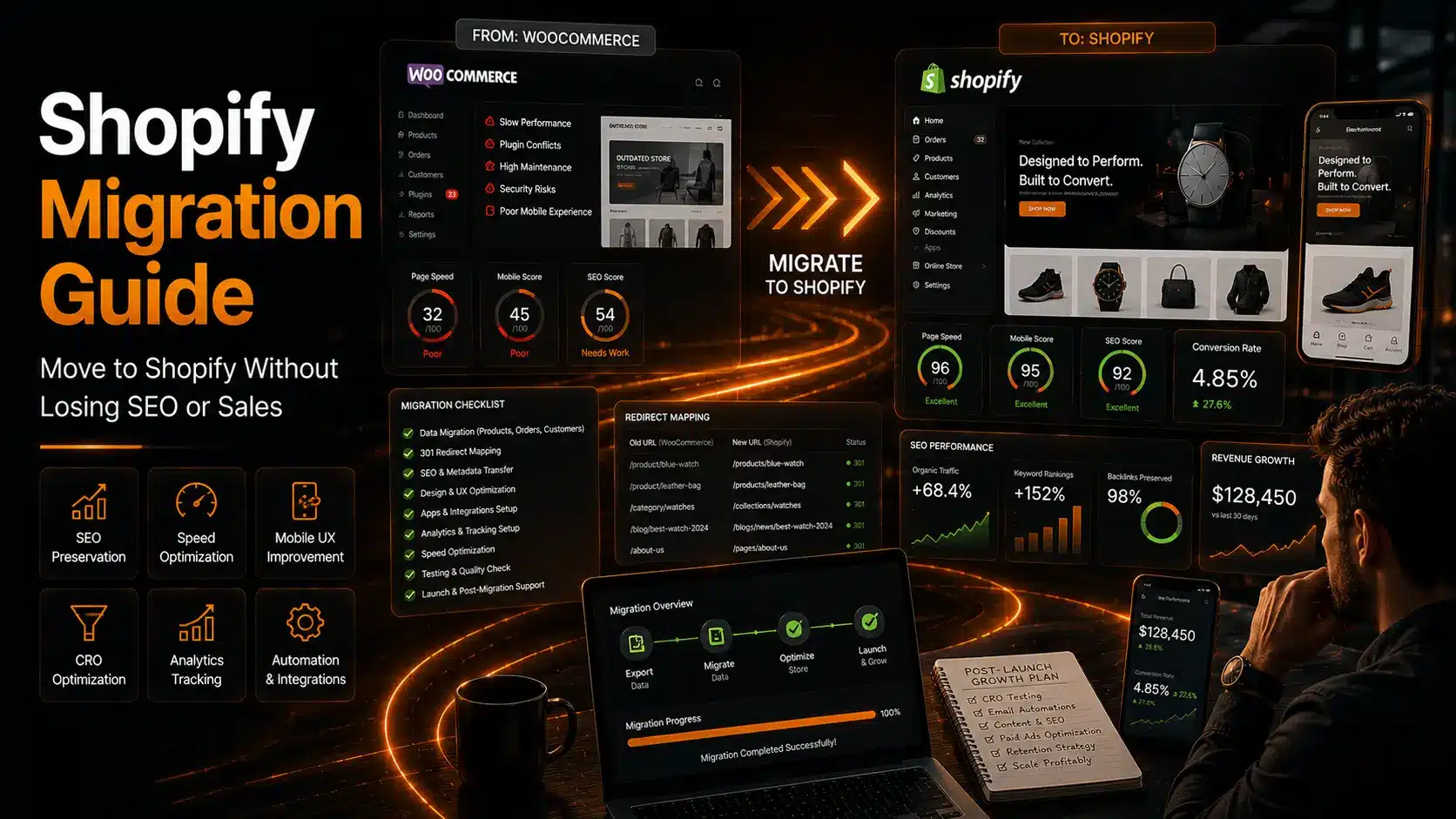
    This guide explains how to migrate to Shopify properly in 2026 without damaging growth.


    Why Businesses Migrate to Shopify

    Most ecommerce businesses eventually outgrow their current setup.

    Common reasons include:

    • slow websites
    • plugin conflicts
    • poor scalability
    • technical maintenance headaches
    • weak mobile experience
    • difficult backend management

    Shopify became dominant because it simplifies:

    • ecommerce management
    • hosting
    • security
    • checkout systems
    • app ecosystems
    • scalability

    But migration must be handled strategically.

    Otherwise businesses lose more than they gain.


    The Biggest Shopify Migration Mistakes

    1. Ignoring SEO Preservation

    This is the most expensive migration mistake.

    Many migrations accidentally destroy:

    • indexed URLs
    • metadata
    • backlinks
    • rankings
    • internal linking

    That leads to:

    • traffic drops
    • ranking losses
    • lower sales

    Professional Shopify migration must include:

    • 301 redirects
    • metadata migration
    • URL mapping
    • sitemap optimization
    • structured data preservation

    At SterlingWeb Growth Labs, SEO preservation is treated as a core migration priority — not an afterthought.


    2. Poor Redirect Planning

    Changing URLs without redirect mapping causes:

    • 404 errors
    • ranking loss
    • broken backlinks
    • bad user experience

    Every important URL should be mapped carefully before launch.


    3. App Overload After Migration

    Many businesses migrate to Shopify and immediately install:

    • 20+ apps
    • unnecessary scripts
    • duplicate tools

    That destroys:

    • speed
    • UX
    • performance

    A clean Shopify architecture matters more than app quantity.


    4. Ignoring Mobile UX

    Many migrated stores technically “work” but convert badly on mobile.

    Migration should improve:

    • mobile navigation
    • speed
    • checkout simplicity
    • product browsing
    • trust signals

    Mobile optimization directly impacts:

    • conversions
    • SEO
    • ad ROI

    What a Professional Shopify Migration Includes

    Real migration is much bigger than product importing.

    A Proper Migration Includes

    Product Migration

    • products
    • variants
    • SKUs
    • images
    • categories
    • tags

    Customer Migration

    • customer accounts
    • order history
    • subscriptions
    • loyalty systems

    SEO Preservation

    • redirect mapping
    • metadata transfer
    • structured data
    • sitemap optimization
    • internal linking

    Analytics & Tracking

    • Google Analytics
    • Meta Pixel
    • conversion tracking
    • server-side tracking

    Many migrations lose historical data continuity because tracking is handled badly.


    Design & UX Optimization

    Migration is the best time to improve:

    • mobile UX
    • conversion flow
    • site speed
    • navigation
    • product presentation

    Migrating without improving UX wastes opportunity.


    WooCommerce to Shopify Migration

    This is one of the most common migrations today.

    Why businesses leave WooCommerce:

    • plugin maintenance
    • hosting problems
    • speed issues
    • security concerns
    • scalability limitations

    WooCommerce offers flexibility.

    But many stores become unstable over time because:

    • plugins conflict
    • themes become bloated
    • maintenance complexity increases

    Shopify reduces operational complexity significantly.

    SterlingWeb Growth Labs helps brands migrate from WooCommerce to Shopify while improving:

    • speed
    • mobile UX
    • conversions
    • scalability

    Not just visual design.


    Magento to Shopify Migration

    Magento is powerful but often becomes:

    • expensive
    • maintenance-heavy
    • developer-dependent

    Many mid-sized businesses migrate to Shopify because they want:

    • easier operations
    • faster deployment
    • simplified management
    • lower maintenance overhead

    Magento migrations require careful planning because data structures are more complex.


    Shopify Migration Timelines

    Typical Timelines

    Migration TypeEstimated Timeline
    Small Store2–4 weeks
    Mid-Sized Store4–8 weeks
    Enterprise Migration2–6 months

    Migration speed depends on:

    • product volume
    • custom functionality
    • integrations
    • SEO complexity
    • design requirements

    Fast migrations without planning usually create problems later.


    Shopify Migration Costs

    Common Pricing Ranges

    Migration TypeEstimated Cost
    Basic Migration$2,000–$5,000
    Optimized Migration$5,000–$15,000
    Enterprise Migration$20,000–$100,000+

    Cheap migrations usually skip:

    • CRO optimization
    • SEO planning
    • speed optimization
    • analytics setup
    • automation systems

    That creates long-term business problems.


    Why Speed Optimization Matters During Migration

    Migration is the perfect time to improve:

    • Core Web Vitals
    • image optimization
    • theme performance
    • mobile responsiveness
    • script cleanup

    Many stores migrate platforms but keep the same performance problems.

    That defeats the purpose.

    At SterlingWeb Growth Labs, Shopify migrations are built around:

    • speed
    • conversions
    • scalability
    • customer experience

    Because migration should improve business performance — not just change platforms.


    Shopify Integrations After Migration

    Modern ecommerce stores depend heavily on integrations.

    Migration often requires reconnecting:

    • CRM systems
    • email platforms
    • warehouse systems
    • ERP software
    • shipping providers
    • subscriptions
    • loyalty systems

    Poor integration planning creates operational chaos after launch.


    What Happens After Migration?

    Most businesses think migration ends after launch.

    Wrong.

    Post-migration optimization is critical.

    Important Post-Migration Tasks

    SEO Monitoring

    Monitor:

    • rankings
    • crawl errors
    • redirects
    • indexing

    Speed Reviews

    Post-launch performance testing matters because:

    • apps
    • scripts
    • tracking tools

    can slow stores later.


    CRO Optimization

    Migration should improve:

    • conversion rates
    • checkout flow
    • mobile UX
    • average order value

    Otherwise the migration did not maximize its value.


    Why Businesses Work With SterlingWeb Growth Labs

    SterlingWeb Growth Labs helps brands with:

    • WooCommerce to Shopify migration
    • Shopify redesigns
    • CRO optimization
    • speed optimization
    • mobile-first UX
    • ecommerce automation
    • scalable ecommerce systems

    We focus on:

    • SEO preservation
    • conversion optimization
    • long-term scalability
    • operational efficiency

    Because migration should improve growth — not create new problems.


    The Truth About Shopify Migration

    Migration is not just technical work.

    It is business transition strategy.

    A successful migration should improve:

    • customer experience
    • operational efficiency
    • speed
    • conversions
    • scalability
    • retention

    If your migration only changes appearance without improving business performance, the opportunity was wasted.


    Final Thoughts

    The biggest migration mistake businesses make is focusing only on launch.

    The smarter focus is:
    “What will this platform allow us to achieve over the next 3–5 years?”

    That is how successful ecommerce brands think.

    Migration should not just move your store.

    It should improve your entire ecommerce system.


    FAQs

    Can Shopify migration hurt SEO?

    Yes, if redirects, metadata, and URL structures are handled badly.

    How long does Shopify migration take?

    Usually between 2–8 weeks depending on complexity.

    Is WooCommerce to Shopify migration worth it?

    For many growing brands, yes — especially for scalability and operational simplicity.

    What is the biggest migration mistake?

    Ignoring SEO preservation and mobile UX optimization.

    Should migration improve conversions too?

    Yes. Migration is the best time to improve CRO and customer experience.

  • What Happens After Your Shopify Store Launches? The Real Growth Phase Begins

    What Happens After Your Shopify Store Launches? The Real Growth Phase Begins

    Most ecommerce businesses think launching a Shopify store is the finish line.

    It is not.

    It is the starting point.

    This is where many Shopify stores quietly fail.

    Businesses spend:

    • weeks building
    • months planning
    • money on design
    • money on development

    Then launch…

    …and stop optimizing.

    That is a mistake.

    The most profitable Shopify brands continuously improve:

    • conversion rates
    • customer experience
    • speed
    • retention
    • automation
    • analytics
    • SEO
    • average order value

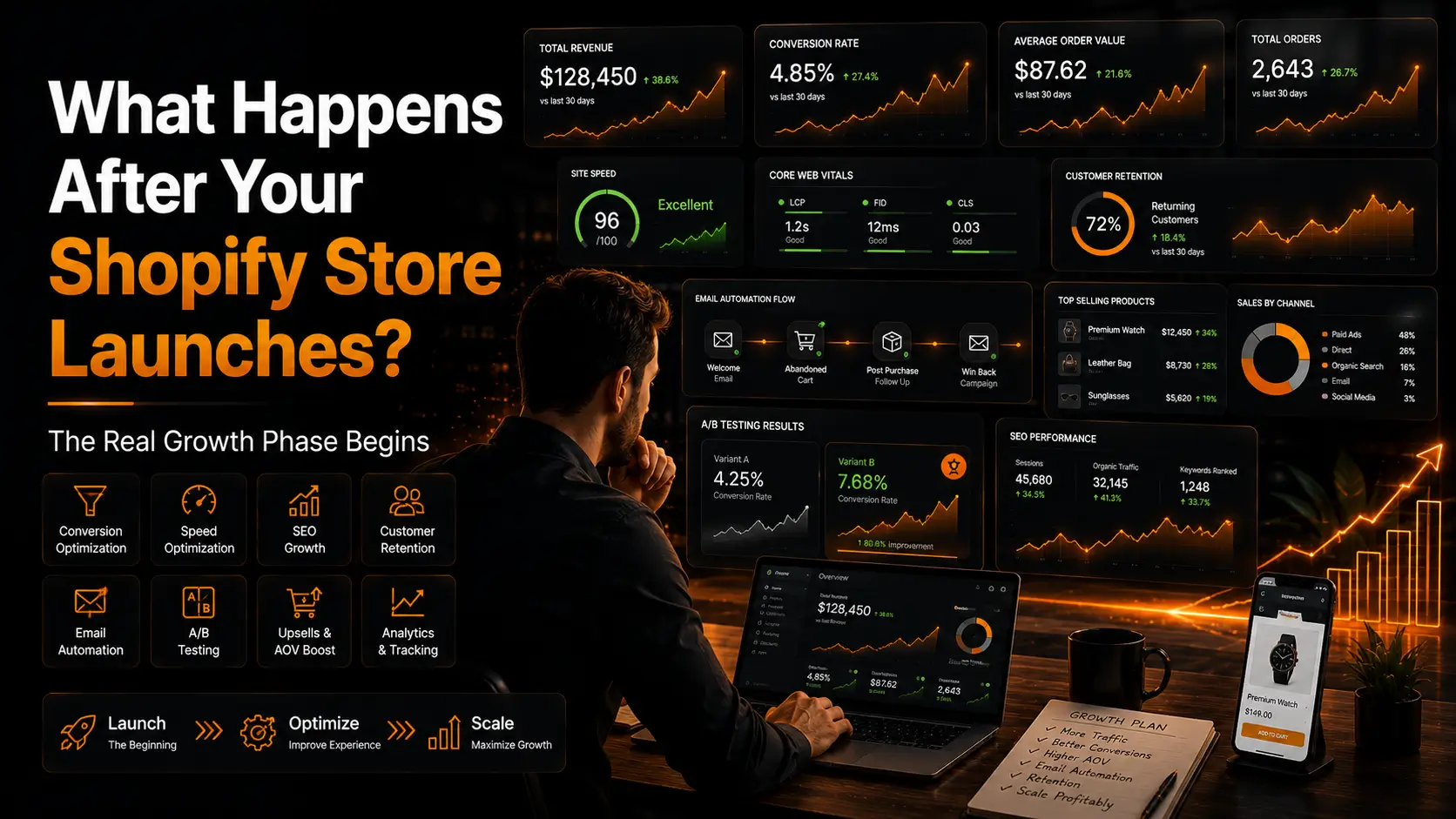
    At SterlingWeb Growth Labs, we treat Shopify launch as phase one — not completion.

    Because ecommerce growth comes from optimization, not just development.

    This guide explains what businesses should actually focus on after launching their Shopify store in 2026.


    The Biggest Post-Launch Mistake Businesses Make

    Most businesses become reactive after launch.

    They only fix problems after:

    • sales drop
    • ads become expensive
    • customers complain
    • conversion rates fall

    Winning ecommerce brands operate differently.

    They continuously improve systems before major problems happen.

    That difference compounds over time.


    Your Shopify Store Should Be Treated Like a Growth System

    Modern ecommerce stores are not static websites anymore.

    Your Shopify store should function like:

    • a sales funnel
    • a conversion engine
    • a customer retention system
    • a marketing automation platform

    That means post-launch optimization becomes critical.


    1. Conversion Rate Optimization (CRO)

    Most stores launch without proper CRO strategy.

    That immediately limits revenue potential.

    What CRO Actually Improves

    Product Pages

    Optimizing:

    • product layout
    • trust signals
    • image hierarchy
    • CTA positioning
    • urgency elements

    can dramatically improve conversions.


    Cart Experience

    Reducing friction through:

    • sticky add-to-cart
    • simplified cart flow
    • trust indicators
    • shipping transparency

    helps reduce abandonment.


    Checkout Optimization

    Checkout issues silently destroy revenue.

    Even small checkout improvements can increase:

    • completed purchases
    • average order value
    • retention

    At SterlingWeb Growth Labs, Shopify stores are designed with conversion-first thinking instead of “just design.”

    That difference matters.


    2. Shopify Speed Optimization

    Many stores become slower after launch because businesses:

    • install too many apps
    • upload unoptimized media
    • add unnecessary scripts

    This hurts:

    • SEO
    • conversions
    • ad performance
    • user experience

    What Professional Shopify Speed Optimization Includes

    • image compression
    • lazy loading
    • app cleanup
    • script optimization
    • Core Web Vitals improvements
    • theme optimization
    • CDN improvements

    A faster Shopify store directly impacts revenue.

    That is not theory anymore.


    3. Analytics & Tracking Setup

    Most businesses make decisions using incomplete data.

    That becomes dangerous.

    Professional tracking should include:

    • Google Analytics
    • Meta Pixel
    • server-side tracking
    • conversion APIs
    • event tracking
    • funnel tracking
    • heatmaps

    Without proper analytics:

    • ad optimization becomes weaker
    • CRO becomes guesswork
    • scaling becomes inefficient

    4. Email & Automation Systems

    Many ecommerce stores still operate manually.

    That limits growth heavily.

    Post-launch automation should include:

    • abandoned cart emails
    • welcome sequences
    • post-purchase flows
    • review requests
    • retention campaigns
    • WhatsApp automation
    • CRM integrations

    Automation increases:

    • repeat purchases
    • retention
    • operational efficiency

    SterlingWeb Growth Labs helps ecommerce brands build scalable automation systems instead of relying on manual workflows.


    5. SEO Optimization After Launch

    Many businesses think SEO is “done” once pages are indexed.

    That is wrong.

    Post-launch SEO should include:

    • technical improvements
    • keyword expansion
    • collection optimization
    • blog content
    • internal linking
    • schema markup
    • speed optimization

    SEO compounds over time.

    The stores that dominate search usually optimize continuously.


    6. A/B Testing & Continuous Improvement

    Most ecommerce stores never properly test anything.

    That means:

    • decisions become emotional
    • assumptions replace data

    Winning brands test:

    • product pages
    • headlines
    • CTAs
    • layouts
    • checkout flow
    • upsell systems

    Small improvements compound into massive revenue differences.


    7. Upsells & Average Order Value Optimization

    Most Shopify stores leave money on the table.

    Good post-launch optimization includes:

    • bundle offers
    • cross-sells
    • post-purchase upsells
    • subscription offers
    • personalized recommendations

    Increasing average order value is often easier than increasing traffic.

    But many stores ignore this completely.


    8. Customer Retention Systems

    Acquiring customers is expensive.

    Retention matters more than most brands realize.

    Post-launch retention systems include:

    • loyalty programs
    • subscriptions
    • email campaigns
    • SMS flows
    • reorder automation
    • customer segmentation

    The brands scaling fastest usually focus heavily on retention.


    9. Mobile Optimization Never Stops

    Mobile UX should be reviewed continuously.

    Because:

    • user behavior changes
    • devices change
    • screen sizes evolve

    Most Shopify traffic today is mobile-first.

    A poor mobile experience destroys:

    • SEO
    • conversions
    • retention
    • ad ROI

    10. Scaling Infrastructure as Your Store Grows

    As revenue grows, stores usually require:

    • advanced integrations
    • better automation
    • ERP systems
    • CRM synchronization
    • advanced reporting
    • warehouse integrations

    Many DIY Shopify setups break under scaling pressure.

    That is why scalable architecture matters early.


    Why Businesses Work With SterlingWeb Growth Labs

    SterlingWeb Growth Labs helps ecommerce brands with:

    • Shopify development
    • CRO optimization
    • Shopify speed optimization
    • automation systems
    • analytics implementation
    • WooCommerce to Shopify migration
    • scalable ecommerce infrastructure
    • conversion-focused UX systems

    We focus on:

    • growth
    • performance
    • scalability
    • retention
    • long-term ecommerce success

    Because a Shopify store should evolve with your business — not hold it back.


    The Truth Most Businesses Learn Too Late

    Launching a Shopify store is easy.

    Building a profitable ecommerce system is hard.

    The businesses that scale successfully usually win because they continuously optimize:

    • conversions
    • retention
    • customer experience
    • automation
    • analytics
    • operational efficiency

    Growth comes from refinement.

    Not just launching.


    Final Thoughts

    Most ecommerce stores are under-optimized.

    Not because the products are bad.

    Because the systems behind the store were never designed properly.

    The real ecommerce advantage in 2026 is no longer:
    “Who launches first?”

    It is:
    “Who optimizes better over time?”

    That is the difference between stores that survive and brands that scale.


    FAQs

    Is Shopify launch the final step?

    No. Launch is only the beginning of optimization and growth.

    What should businesses improve after launch?

    CRO, speed, SEO, analytics, automation, and retention systems.

    Why does Shopify speed matter so much?

    Speed impacts conversions, SEO rankings, bounce rates, and ad performance.

    What is the most overlooked post-launch strategy?

    Customer retention and automation systems.

    How often should Shopify stores be optimized?

    Continuously. High-performing ecommerce stores evolve constantly.

  • Shopify Theme Customization: DIY vs Hiring a Developer in 2026

    Shopify Theme Customization: DIY vs Hiring a Developer in 2026

    Shopify made ecommerce easier.

    That is both its biggest strength and biggest trap.

    Today almost anyone can:

    • install a theme
    • upload products
    • connect payments
    • launch a Shopify store

    And because of that, many business owners believe:
    “I don’t need a Shopify developer.”

    Technically, they are correct.

    Strategically, many of them are making expensive mistakes.

    There is a huge difference between:

    • launching a Shopify store
      and
    • building a Shopify store that actually converts profitably.

    At SterlingWeb Growth Labs, we regularly work with businesses that started with DIY Shopify setups and later realized:

    • their site was slow
    • conversions were weak
    • mobile UX was broken
    • SEO structure was poor
    • app conflicts were hurting performance
    • customers were dropping during checkout

    This guide explains when DIY Shopify makes sense, when hiring professionals becomes necessary, and how to avoid the most common ecommerce mistakes.


    Can Beginners Build a Shopify Store Themselves?

    Yes.

    And for some businesses, that is perfectly fine initially.

    Shopify is designed for usability.

    A beginner can:

    • choose a theme
    • upload products
    • connect payment gateways
    • launch within a few days

    For testing an idea, DIY Shopify works.

    But most beginners confuse:
    “store setup”
    with
    “ecommerce optimization.”

    Those are completely different things.


    What DIY Shopify Usually Gets Wrong

    Most beginner stores fail in areas they don’t even notice.

    Common DIY Problems

    1. Poor Mobile Experience

    Most ecommerce traffic is mobile.

    Yet many DIY stores:

    • look cluttered on phones
    • have weak navigation
    • use oversized sections
    • create checkout friction

    A desktop-friendly store does not guarantee mobile conversions.


    2. Slow Website Speed

    Beginners usually install too many apps.

    Every app adds:

    • scripts
    • requests
    • performance load

    This creates:

    • slow loading
    • poor Core Web Vitals
    • reduced SEO rankings
    • lower conversion rates

    Most beginners never optimize performance properly.


    3. Weak Conversion Optimization

    DIY stores usually focus on appearance instead of psychology.

    But ecommerce success depends heavily on:

    • trust signals
    • product positioning
    • CTA placement
    • urgency systems
    • checkout simplicity
    • customer flow

    Beautiful stores can still convert badly.


    4. Technical SEO Problems

    Many Shopify stores launch with:

    • poor metadata
    • weak heading structures
    • duplicate pages
    • oversized images
    • indexing issues

    That hurts long-term visibility.


    What Does a Professional Shopify Developer Actually Do?

    Most people think Shopify developers only write code.

    Professional Shopify development is much broader.

    A good Shopify developer improves:

    • customer experience
    • conversion rate
    • performance
    • retention
    • automation
    • scalability

    At SterlingWeb Growth Labs, Shopify development combines:

    • UX thinking
    • CRO strategy
    • performance optimization
    • automation systems
    • technical SEO
    • ecommerce psychology

    Because modern ecommerce stores need more than design.

    They need systems that generate revenue consistently.


    When DIY Shopify Makes Sense

    DIY Shopify is reasonable when:

    • you are testing a new idea
    • budget is extremely limited
    • product validation matters more than branding
    • you only need a temporary setup
    • traffic volume is low

    For MVP ecommerce projects, speed matters more than perfection.

    But eventually growth creates complexity.

    That is where DIY setups usually struggle.


    When You Should Hire a Shopify Developer

    Professional Shopify help becomes important when:

    1. Your Store Starts Generating Revenue

    Once real revenue starts coming in:

    • conversion improvements matter
    • speed matters
    • retention matters
    • UX matters

    Small optimization improvements create major revenue differences.


    2. Your Ads Become Expensive

    Poor UX destroys ad ROI.

    If you are spending on:

    • Meta ads
    • Google ads
    • influencer campaigns

    then conversion optimization becomes critical.

    Driving traffic to a weak store burns money.


    3. You Need Custom Features

    DIY setups struggle with:

    • subscriptions
    • advanced filters
    • custom product experiences
    • automation workflows
    • CRM integrations
    • wholesale systems

    That requires professional development.


    4. You Want Long-Term Scalability

    Most DIY stores become messy over time:

    • app overload
    • broken sections
    • inconsistent UX
    • technical debt

    Professional architecture prevents scaling problems later.


    Shopify Theme Customization vs Custom Development

    Most businesses misunderstand this difference.

    Theme Customization

    This includes:

    • changing layouts
    • modifying sections
    • improving branding
    • mobile optimization
    • conversion improvements

    This is enough for many businesses initially.


    Custom Shopify Development

    This includes:

    • advanced functionality
    • custom apps
    • API integrations
    • unique customer flows
    • advanced automation
    • personalized experiences

    Not every store needs fully custom development.

    But high-growth brands usually need more than simple theme editing.


    Can AI Replace Shopify Developers?

    This question is growing rapidly in 2026.

    The honest answer:

    AI helps developers.

    AI does not replace ecommerce expertise.

    AI tools can:

    • generate code snippets
    • create product descriptions
    • assist with layouts
    • speed up development

    But AI cannot fully understand:

    • customer psychology
    • CRO strategy
    • UX decisions
    • business positioning
    • conversion optimization
    • retention systems

    Most AI-generated ecommerce setups still require experienced human review.

    At SterlingWeb Growth Labs, AI is used to improve efficiency — not replace strategy.

    That distinction matters.


    Why Mobile Optimization Matters More Than Ever

    Most Shopify traffic today comes from mobile devices.

    Yet many stores are still designed desktop-first.

    That is backwards.

    A Shopify developer should prioritize:

    • thumb-friendly UX
    • fast mobile speed
    • simplified navigation
    • quick checkout
    • mobile trust signals

    Mobile optimization directly impacts:

    • conversion rates
    • bounce rates
    • SEO
    • ad performance

    Mobile UX is no longer optional.


    Shopify Speed Optimization: What Professionals Improve

    Professional Shopify optimization includes:

    • image compression
    • lazy loading
    • app reduction
    • JavaScript optimization
    • theme cleanup
    • CDN optimization
    • Core Web Vitals improvements

    A fast Shopify store:

    • ranks better
    • converts better
    • reduces ad costs
    • improves retention

    Speed impacts revenue more than most businesses realize.


    The Biggest Mistake DIY Store Owners Make

    Trying to save money while losing revenue silently.

    Many businesses delay professional help because:
    “the store works.”

    But “working” is not the same as performing well.

    A poorly optimized store may still process orders while:

    • losing conversions
    • reducing trust
    • hurting SEO
    • increasing ad costs

    That hidden revenue loss becomes massive over time.


    Why Businesses Work With SterlingWeb Growth Labs

    SterlingWeb Growth Labs helps ecommerce brands build:

    • custom Shopify stores
    • conversion-focused UX systems
    • Shopify redesigns
    • speed-optimized stores
    • mobile-first ecommerce experiences
    • automation systems
    • scalable ecommerce infrastructure

    We focus on:

    • growth
    • performance
    • CRO
    • scalability
    • long-term support

    Because ecommerce success is not about launching a store.

    It is about building a system that consistently converts traffic into revenue.


    Final Thoughts

    DIY Shopify is fine for learning.

    It is fine for testing.

    It is fine for early experimentation.

    But serious ecommerce growth eventually requires:

    • optimization
    • strategy
    • technical expertise
    • customer experience thinking

    The real question is not:
    “Can I build my Shopify store myself?”

    The real question is:
    “How much revenue am I losing because my store is not professionally optimized?”

    That is the difference between hobby ecommerce and scalable ecommerce.


    FAQs

    Can beginners build Shopify stores themselves?

    Yes. Shopify is beginner-friendly, but DIY stores often struggle with performance and conversions later.

    Is hiring a Shopify developer worth it?

    Yes, especially if your business depends on paid traffic, SEO, and conversion optimization.

    What’s the difference between Shopify customization and custom development?

    Customization modifies themes. Custom development creates advanced functionality and integrations.

    Can AI build Shopify stores?

    AI can assist development but cannot fully replace ecommerce strategy, CRO, and UX expertise.

    When should I hire a Shopify expert?

    Usually when your store starts generating revenue or scaling traffic.

  • Shopify Development Costs Explained: What Businesses Should Actually Budget For in 2026

    Shopify Development Costs Explained: What Businesses Should Actually Budget For in 2026

    One of the biggest mistakes ecommerce businesses make is underestimating Shopify development costs.

    Most business owners think:
    “I just need a Shopify website.”

    But ecommerce development is not just website creation anymore.

    A modern Shopify store involves:

    • conversion optimization
    • mobile UX
    • automation
    • analytics
    • SEO
    • integrations
    • speed optimization
    • customer retention systems

    That is why Shopify pricing varies massively between developers, freelancers, and agencies.

    At SterlingWeb Growth Labs, we regularly see businesses rebuilding stores because they originally hired based only on low pricing instead of long-term business performance.

    Cheap Shopify development often becomes the most expensive option later.

    This guide breaks down the real Shopify development costs in 2026 and explains where businesses usually waste money.


    How Much Does Shopify Development Actually Cost?

    There is no universal Shopify pricing because project complexity changes everything.

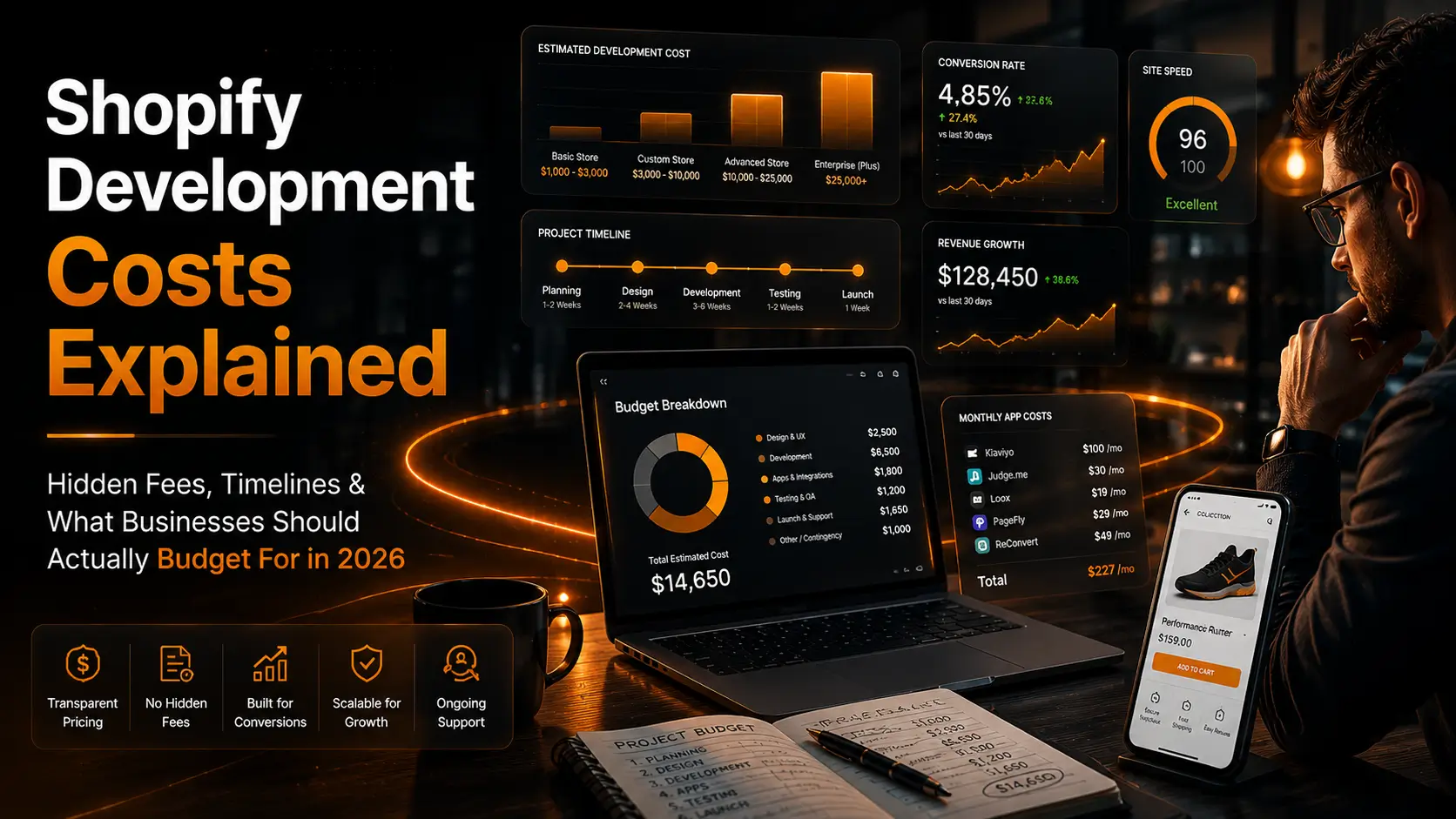
    Typical Shopify Pricing in 2026

    Project TypeEstimated Cost
    Basic Theme Setup$500–$2,000
    Customized Shopify Store$3,000–$10,000
    High-Converting Ecommerce Store$10,000–$25,000
    Shopify Plus / Enterprise$25,000–$100,000+

    Businesses comparing only numbers without understanding deliverables usually make bad decisions.

    A $1,000 store and a $15,000 store are completely different products.

    One is setup work.

    The other is ecommerce infrastructure built for scaling.


    Freelancer vs Agency Pricing

    Shopify Freelancer Pricing

    Freelancers usually charge:

    • $15–$40/hour for beginner to mid-level
    • $50–$150+/hour for experienced Shopify specialists

    Freelancers are useful for:

    • quick edits
    • small tasks
    • bug fixes
    • short-term projects

    But many freelancers struggle with:

    • CRO strategy
    • advanced integrations
    • scaling systems
    • long-term support
    • performance optimization

    Shopify Agency Pricing

    Professional Shopify agencies cost more because they provide:

    • strategy
    • UX design
    • CRO optimization
    • developers
    • SEO specialists
    • QA testing
    • automation setup
    • long-term scaling support

    At SterlingWeb Growth Labs, Shopify projects are approached from a growth perspective instead of just visual design.

    That means stores are built around:

    • conversions
    • performance
    • scalability
    • customer experience
    • retention

    Not just appearance.


    The Biggest Hidden Shopify Costs

    Most ecommerce businesses only calculate “website cost.”

    That is a major mistake.

    Hidden Costs Most Businesses Ignore

    1. Shopify Apps

    Many stores rely on:

    • upsell apps
    • review apps
    • email systems
    • subscriptions
    • loyalty programs
    • automation tools

    Monthly app costs can easily become:

    • $100/month
    • $300/month
    • $1,000+/month for advanced stores

    Bad developers install too many apps instead of building optimized systems.

    That slows stores and increases operational costs.


    2. Premium Themes

    Premium Shopify themes usually cost:

    • $200–$500+

    Custom themes cost more initially but often perform better long term.


    3. CRO Optimization

    Most stores launch without proper conversion optimization.

    Later businesses pay extra for:

    • product page optimization
    • cart optimization
    • mobile UX improvements
    • A/B testing
    • checkout improvements

    Stores that ignore CRO burn money on ads.


    4. SEO Fixes

    Poor Shopify builds often create:

    • duplicate content issues
    • poor URL structures
    • slow loading pages
    • indexing problems

    Fixing technical SEO later is usually more expensive than doing it properly initially.


    5. Maintenance & Support

    Most stores need ongoing help for:

    • app updates
    • bug fixes
    • speed optimization
    • analytics issues
    • integrations
    • CRO updates

    A Shopify store is not a “one-time project.”

    Profitable stores evolve continuously.


    Why Cheap Shopify Development Usually Fails

    Cheap development typically focuses on:

    • fast delivery
    • copied themes
    • app overload
    • visual appearance only

    What gets ignored:

    • conversions
    • performance
    • customer psychology
    • retention
    • scalability

    This creates problems later:

    • slow speed
    • poor mobile UX
    • low conversion rates
    • app conflicts
    • technical debt

    The businesses that scale successfully usually invest properly from the beginning.


    How Long Does Shopify Development Take?

    Realistic Timelines

    Store TypeEstimated Timeline
    Basic Store1–2 weeks
    Customized Store3–6 weeks
    Advanced Ecommerce Store6–12 weeks
    Enterprise Shopify Plus3–6 months

    If someone promises:
    “Complete custom Shopify store in 2 days”

    they are cutting corners somewhere.

    Professional ecommerce development requires:

    • planning
    • UX thinking
    • testing
    • optimization
    • QA

    Fast delivery without strategy usually creates long-term issues.


    What Affects Shopify Development Pricing?

    Major Cost Factors

    1. Custom Design

    Fully custom Shopify UX costs more than template modification.

    But custom UX usually converts better.


    2. Integrations

    Advanced integrations increase development complexity:

    • CRM systems
    • ERP software
    • email automation
    • warehouse systems
    • subscription systems

    3. Shopify Migrations

    Migrating from:

    • WooCommerce
    • Magento
    • Wix
    • BigCommerce

    requires:

    • product migration
    • SEO preservation
    • redirects
    • testing
    • app replacement

    Bad migrations destroy rankings and revenue.

    SterlingWeb Growth Labs handles migration projects with performance and SEO preservation in mind.


    4. Custom Functionality

    Features like:

    • subscriptions
    • wholesale systems
    • advanced filters
    • custom calculators
    • personalized experiences

    increase development requirements significantly.


    Payment Structures: What’s Normal?

    Professional Shopify projects usually follow:

    Common Payment Models

    Fixed Pricing

    Best for:

    • clearly defined projects

    Milestone Payments

    Example:

    • 40% upfront
    • 30% midway
    • 30% before launch

    Monthly Retainers

    Best for:

    • ongoing optimization
    • support
    • CRO
    • maintenance

    Avoid developers demanding 100% upfront without milestone protection.


    How to Avoid Overpaying for Shopify Development

    1. Focus on Outcomes, Not Just Design

    Ask:

    • Will this improve conversions?
    • Will this improve speed?
    • Will this scale?

    Not:
    “Does it look modern?”


    2. Avoid App Overload

    Many stores become slow because developers solve everything using apps.

    Good developers reduce dependency where possible.


    3. Prioritize Mobile Experience

    Most Shopify traffic is mobile.

    Ignoring mobile UX destroys conversion rates.


    4. Ask About Post-Launch Support

    Many problems appear after launch:

    • tracking issues
    • speed drops
    • checkout bugs
    • app conflicts

    Ongoing support matters.


    What Happens After Launch?

    This is where real ecommerce growth starts.

    After launch businesses usually need:

    • CRO optimization
    • speed improvements
    • SEO scaling
    • analytics reviews
    • automation setup
    • retention systems
    • upsell optimization

    At SterlingWeb Growth Labs, launch is considered the starting point — not the finish line.


    Why Businesses Choose SterlingWeb Growth Labs

    SterlingWeb Growth Labs helps ecommerce brands build:

    • high-converting Shopify stores
    • Shopify CRO systems
    • WooCommerce to Shopify migrations
    • performance-optimized stores
    • mobile-first ecommerce experiences
    • automation workflows
    • scalable ecommerce systems

    We focus on:

    • speed
    • conversions
    • scalability
    • growth strategy
    • long-term support

    Because a Shopify store should function like a revenue engine — not just a website.


    Final Thoughts

    The cheapest Shopify quote is rarely the cheapest long term.

    Good Shopify development is not about:

    • installing themes
    • adding apps
    • launching quickly

    It is about building:

    • scalable systems
    • high-converting experiences
    • optimized customer journeys
    • long-term ecommerce infrastructure

    The real question is not:
    “How cheap can I build my store?”

    The real question is:
    “How much revenue will poor development cost me later?”


    FAQs

    Is Shopify worth paying a developer for?

    Yes. Professional developers improve conversions, speed, UX, SEO, and scalability.

    Why are Shopify agencies expensive?

    Because they usually provide strategy, design, CRO, development, QA, and ongoing support.

    What is the biggest hidden Shopify cost?

    Apps, maintenance, CRO work, and ongoing optimization.

    How much should a serious Shopify store cost?

    Most serious ecommerce brands spend between $5,000–$25,000 depending on complexity.

    Can cheap Shopify stores still succeed?

    Rarely at scale. Most cheap stores struggle with performance and conversion issues later.

  • How to Hire the Right Shopify Developer in 2026 (Without Wasting Money)

    How to Hire the Right Shopify Developer in 2026 (Without Wasting Money)

    Most Shopify stores fail before marketing even starts.

    Not because Shopify is bad.

    Not because the products are weak.

    Because businesses hire the wrong developer.

    A poor Shopify setup creates problems that destroy growth later:

    • Slow website speed
    • Low mobile conversions
    • Broken customer journeys
    • SEO issues
    • App conflicts
    • Poor user experience
    • High bounce rates
    • Low conversion rates

    And the worst part?

    Most business owners don’t realize these problems exist until they already start losing money on ads and traffic.

    Hiring a Shopify developer is not just a technical decision anymore.

    It is a revenue decision.

    At SterlingWeb Growth Labs, we have seen businesses spend thousands fixing stores that were originally built cheaply without strategy. The reality is simple:

    Cheap Shopify development usually becomes expensive later.

    This guide explains how to hire the right Shopify developer in 2026 without wasting time, money, or growth potential.


    What Does a Shopify Developer Actually Do?

    Most people think Shopify developers only:

    • install themes
    • upload products
    • customize pages

    That is beginner-level work.

    A professional Shopify developer should help improve:

    • conversion rates
    • site speed
    • customer experience
    • SEO performance
    • mobile responsiveness
    • checkout flow
    • retention systems
    • scalability

    A real Shopify developer combines:

    • development
    • ecommerce strategy
    • UX thinking
    • CRO optimization
    • performance optimization

    That is the difference between a store that “looks good” and a store that actually generates revenue.

    At SterlingWeb Growth Labs, Shopify development is approached as a growth system — not just a website project.


    How Much Does It Cost to Hire a Shopify Developer?

    This depends on the type of developer you hire.

    Shopify Freelancer Pricing

    Typical freelancer rates:

    • Beginner: $10–$25/hour
    • Mid-level: $25–$60/hour
    • Advanced Shopify specialist: $75–$150+/hour

    Shopify Agency Pricing

    Typical agency pricing:

    • Basic Shopify store: $1,500–$5,000
    • Custom conversion-focused store: $5,000–$15,000
    • Enterprise ecommerce system: $15,000–$50,000+

    If someone offers to build a “professional Shopify store” for $200–$300, understand what usually happens:

    • copied themes
    • bloated apps
    • poor speed optimization
    • weak mobile UX
    • no CRO strategy
    • no scalability planning

    That is not ecommerce development.

    That is template installation.


    Shopify Freelancer vs Shopify Agency

    This is one of the biggest decisions businesses struggle with.

    When a Freelancer Makes Sense

    Freelancers are useful when:

    • your budget is limited
    • you need small changes
    • you need short-term support
    • the project scope is simple

    When an Agency Makes More Sense

    Agencies become valuable when your business needs:

    • long-term scaling
    • CRO optimization
    • technical SEO
    • custom functionality
    • automation systems
    • advanced integrations
    • dedicated support
    • white-label development

    The truth most people avoid saying:

    Many freelancers are developers.

    Very few are ecommerce growth partners.

    That distinction matters.

    SterlingWeb Growth Labs works with businesses that want:

    • scalable Shopify systems
    • high-converting UX
    • performance optimization
    • automation workflows
    • ongoing growth support

    Not just “website delivery.”


    Red Flags When Hiring a Shopify Developer

    Most bad Shopify projects show warning signs early.

    Businesses ignore them because they focus only on price.

    Major Red Flags

    1. No Real Portfolio

    If their portfolio only shows screenshots without:

    • live stores
    • performance proof
    • conversion improvements
    • case studies

    be careful.

    A beautiful homepage proves nothing.

    The important question is:
    Did the store perform?


    2. They Only Talk About Design

    Good ecommerce developers discuss:

    • speed
    • conversions
    • mobile UX
    • customer journey
    • SEO structure
    • retention

    If the conversation is only about “making it look modern,” that is a problem.

    Design without strategy does not scale revenue.


    3. They Promise Unrealistic Timelines

    Professional Shopify development takes planning.

    If someone promises:
    “Full custom Shopify store in 3 days”

    they are either:

    • using shortcuts
    • copying work
    • outsourcing badly
    • skipping optimization

    4. No Post-Launch Support

    Most ecommerce growth happens after launch.

    If your developer disappears after delivery, you will struggle later with:

    • app conflicts
    • bugs
    • speed drops
    • checkout issues
    • analytics problems

    5. Poor Communication

    Communication problems during sales usually become worse during development.

    If replies are:

    • inconsistent
    • vague
    • confusing
    • delayed

    expect project issues later.


    What Questions Should You Ask Before Hiring?

    Most businesses ask weak questions like:
    “How much?”
    “How fast?”

    Those are not enough.

    Better Questions to Ask

    Technical Questions

    • How do you optimize Shopify speed?
    • How do you improve mobile conversions?
    • Which apps do you avoid and why?
    • How do you handle SEO during migration?
    • What is your testing process before launch?

    Business Questions

    • How will this store improve conversions?
    • What KPIs should improve after launch?
    • How do you approach CRO?
    • What happens after launch?
    • What ongoing support do you provide?

    Professional developers should think beyond coding.


    How to Vet a Shopify Developer’s Portfolio

    This is where most businesses fail badly.

    They judge portfolios emotionally instead of strategically.

    What Actually Matters

    1. Mobile Experience

    Open stores on your phone.

    Most Shopify traffic is mobile.

    If the mobile experience feels weak, conversions will suffer.


    2. Site Speed

    Check:

    • load speed
    • responsiveness
    • smoothness
    • checkout flow

    Slow stores kill ad ROI.


    3. Industry Understanding

    A luxury brand should not look like a discount store.

    A good developer adapts UX based on:

    • target audience
    • buying psychology
    • customer behavior

    4. Real Business Logic

    Look for:

    • upsells
    • trust signals
    • sticky add-to-cart
    • CRO elements
    • retention systems

    Good ecommerce development is strategic.


    Should You Hire Local or Remote Shopify Developers?

    Many businesses still think local developers are safer.

    That is outdated thinking.

    Local Developer Advantages

    • easier meetings
    • local market familiarity

    Remote Developer Advantages

    • better talent pool
    • global ecommerce expertise
    • often stronger technical skills
    • scalability

    The ecommerce industry is already remote-first.

    The smarter question is not:
    “Are they local?”

    The smarter question is:
    “Can they grow the business?”


    Best Places to Find Shopify Developers

    Recommended Platforms

    • Shopify Partners Directory
    • LinkedIn
    • Clutch
    • Upwork
    • Ecommerce communities
    • Agency referrals

    But platforms alone do not solve hiring problems.

    Bad developers exist everywhere.

    The evaluation process matters more than the platform.


    How to Find Shopify Developers on LinkedIn

    Most people search:
    “Shopify Developer”

    That is too broad.

    Instead search for:

    • Shopify CRO specialist
    • Shopify performance expert
    • Shopify Plus developer
    • ecommerce UX developer
    • Shopify conversion optimization

    Then review:

    • case studies
    • content quality
    • technical knowledge
    • ecommerce understanding

    Developers who teach publicly are often more credible than developers hiding behind generic portfolios.


    What Makes a Great Shopify Developer?

    A good Shopify developer builds stores.

    A great Shopify developer understands:

    • ecommerce psychology
    • customer intent
    • conversion optimization
    • retention systems
    • speed performance
    • analytics
    • SEO structure
    • scalability

    The biggest difference is business thinking.

    At SterlingWeb Growth Labs, stores are built around:

    • conversion-first UX
    • scalable architecture
    • performance optimization
    • growth systems
    • long-term support

    Because a Shopify store should function like a sales machine — not just an online brochure.


    Getting Multiple Shopify Quotes: What’s Normal?

    You should always compare multiple proposals.

    But here is the mistake businesses make:

    They compare only price.

    You should compare:

    • deliverables
    • strategy
    • support
    • scalability
    • optimization
    • communication quality
    • growth understanding

    A $2,000 store and a $10,000 store are often completely different products.

    One is setup work.

    The other is ecommerce infrastructure.


    Final Thoughts

    The wrong Shopify developer can:

    • waste your budget
    • slow your growth
    • hurt conversions
    • damage SEO
    • create long-term technical problems

    The right Shopify development partner helps:

    • improve conversions
    • optimize customer experience
    • scale operations
    • increase retention
    • support long-term growth

    That difference becomes very expensive over time.

    Most ecommerce brands do not fail because of Shopify.

    They fail because their store was never strategically built for growth.


    Why Businesses Work With SterlingWeb Growth Labs

    SterlingWeb Growth Labs helps ecommerce brands build:

    • high-converting Shopify stores
    • custom Shopify experiences
    • WooCommerce to Shopify migrations
    • CRO-focused UX systems
    • Shopify speed optimization
    • automation workflows
    • scalable ecommerce infrastructure

    Our focus is not just development.

    Our focus is building Shopify systems designed to grow revenue.


    FAQs

    Is hiring a Shopify developer worth it?

    Yes, especially if your store depends on conversions, speed, SEO, and scalability.

    Can beginners build Shopify stores themselves?

    Yes, but DIY stores usually struggle with performance, CRO, and scalability.

    How long does Shopify development take?

    Typically between 2–8 weeks depending on complexity.

    Should I hire a freelancer or agency?

    Freelancers work for small projects. Agencies are better for long-term ecommerce growth.

    What is the biggest mistake when hiring Shopify developers?

    Choosing based only on price instead of business outcomes.

  • How We Build WordPress Websites That Rank, Convert, and Scale

    How We Build WordPress Websites That Rank, Convert, and Scale

    Most WordPress websites fail for a simple reason—they are built for looks, not performance. They might look clean, but they don’t rank on Google, don’t convert visitors, and completely fall apart when traffic increases.

    We approach WordPress differently. Every website we build is designed as a system that brings traffic, converts users, and scales as the business grows.

    Here’s how that actually works.


    Strategy Before Anything Else

    We don’t start with design. We start with clarity.

    Every project begins with understanding:

    • Who the target audience is
    • What action we want them to take
    • How users will move through the site
    • Where competitors are weak

    Without this, design is just decoration. With this, every section of the website has a clear purpose.


    SEO Built Into the Foundation

    SEO is not something we “add later.” It is built from the ground up.

    We structure websites with:

    • Clean and logical URL hierarchy
    • Keyword-focused page architecture
    • Strong internal linking
    • Schema markup for better visibility
    • Optimized Core Web Vitals

    This makes it easier for search engines to understand the site and rank it faster.


    Conversion-Focused Design

    A website that doesn’t convert is a liability.

    We design with intent:

    • Clear messaging in the first few seconds
    • Strategic call-to-actions placed across the page
    • Trust signals like testimonials and proof
    • Mobile-first layouts
    • Simple, low-friction forms

    Every element is designed to move the visitor closer to taking action.


    Speed and Performance Optimization

    Speed directly impacts both rankings and conversions.

    We optimize every website for:

    • Fast loading times under 2 seconds
    • Lightweight themes and minimal plugins
    • Image compression and modern formats
    • Advanced caching and CDN setup
    • Clean and optimized database

    A fast website doesn’t just rank better—it converts better.


    Built to Scale From Day One

    Most websites break when businesses grow. We avoid that completely.

    Our builds include:

    • Modular and flexible design systems
    • Custom post types for structured content
    • Reusable templates and components
    • Clean development practices
    • Scalable architecture for future expansion

    So whether traffic doubles or features expand, the website keeps performing.


    Content That Gets Discovered

    Ranking is one part. Discovery is another.

    We focus on:

    • High-quality visuals that stand out
    • Clear, engaging headlines
    • Useful, relevant content
    • Consistent publishing strategy

    This improves visibility not just in search, but also in platforms like Google Discover.


    Data-Driven Improvements

    Launching a website is just the beginning.

    We track everything:

    • User behavior
    • Conversion rates
    • Click patterns
    • Funnel performance

    This data is used to continuously improve performance instead of relying on guesswork.


    Security and Reliability

    A slow or hacked website can destroy trust instantly.

    We implement:

    • Secure configurations and firewalls
    • Regular backups
    • Safe login systems
    • Ongoing maintenance

    The goal is simple—your website should always be fast, secure, and online.


    The Bottom Line

    A high-performing WordPress website is not about themes or plugins. It’s about how everything is put together.

    When strategy, SEO, design, performance, and scalability work together, the website becomes a growth engine—not just an online presence.


  • From 0 to ₹10L/Month: The Exact Shopify Store Structure That Converts

    From 0 to ₹10L/Month: The Exact Shopify Store Structure That Converts

    Most Shopify stores don’t fail because of the product. They fail because of structure.

    Random pages, weak product positioning, slow checkout, and zero funnel thinking—that’s what kills conversions.

    If your store isn’t doing consistent revenue, the issue is not traffic. It’s how your store is built.

    Here’s the exact structure used to take a Shopify store from zero to ₹10L/month.


    The Foundation: One Product, One Goal

    Stop trying to sell everything.

    A high-converting store starts with:

    • One primary product (or tightly focused niche)
    • One clear problem solved
    • One target audience

    The more focused your store is, the easier it is to sell.


    Homepage That Acts Like a Sales Page

    Your homepage is not for browsing. It’s for converting.

    Structure it like this:

    • Strong headline (clear benefit, not features)
    • Product in action (visual proof)
    • Key benefits (quick scan points)
    • Social proof (reviews, testimonials, UGC)
    • Problem → Solution breakdown
    • Call-to-action placed multiple times

    If your homepage doesn’t push users toward buying, it’s wasting traffic.


    Product Page That Eliminates Doubt

    This is where most stores lose money.

    A proper product page includes:

    • Scroll-stopping product images and videos
    • Clear benefit-driven headline
    • Short, punchy description
    • Bullet-point benefits
    • Trust badges and guarantees
    • Real customer reviews
    • FAQs to remove objections
    • Urgency triggers (limited stock, offers)

    Every question a customer has should be answered before they think of leaving.


    High-Converting Checkout Flow

    Complicated checkout = lost revenue.

    You need:

    • Minimal fields
    • Guest checkout option
    • Multiple payment methods
    • Clear shipping and return policy
    • No distractions

    Speed and simplicity win here.


    Mobile-First Experience

    Most traffic is mobile. If your store isn’t optimized for it, you’re losing money.

    Focus on:

    • Fast loading on mobile
    • Easy navigation
    • Sticky add-to-cart buttons
    • Thumb-friendly design

    If it’s not smooth on mobile, it won’t scale.


    Backend That Drives Revenue

    A real Shopify store doesn’t stop at design.

    You need systems:

    • Email flows (abandoned cart, upsell, retention)
    • SMS follow-ups
    • Retargeting ads
    • Upsell and cross-sell logic
    • Analytics tracking

    This is where most of the profit actually comes from.


    Traffic That Converts (Not Just Clicks)

    Bad traffic destroys stores.

    Focus on:

    • High-intent audiences
    • Creative testing (ads that hook attention fast)
    • Landing page alignment with ads
    • Retargeting warm users

    Don’t chase cheap traffic. Chase buying intent.


    Scaling to ₹10L/Month

    Once the foundation is solid, scaling becomes simple:

    • Increase ad spend on winning creatives
    • Improve conversion rate continuously
    • Introduce upsells and bundles
    • Expand into new audiences
    • Optimize repeat purchases

    Scaling is not magic. It’s controlled growth based on data.


    The Reality

    Most Shopify stores fail because they are built like catalogs, not sales machines.

    A high-performing store is:

    • Focused
    • Structured
    • Optimized for conversion
    • Backed by systems

    Get this right, and revenue follows.